

Lovable and Bolt are AI app builders: describe a web app in plain English, preview what they generate and ask for changes through chat. For a founder turning an idea into a small product or internal tool, both offer a way to start without writing the whole app from scratch.
The choice matters when you need to change the result, work with saved data and pay for continued use. This comparison focuses on those decisions for a first web app, using a small build in each tool alongside their documented plan rules.
Lovable vs Bolt: which should you try first?
If you want to edit the code without upgrading, check Bolt first in a supported desktop browser. Its documentation allows manual changes without spending agent tokens, while Safari’s Code view is read-only. Lovable’s built-in code editing is paid, although GitHub sync is available on Free. That recommendation comes from the plan rules; manual editing was not compared in the tests below. Sources: Bolt Code view, Bolt token rules and Lovable plans.
Both are worth trying for a small app built through prompts. Lovable remains an option if paid in-app code editing is acceptable or its Free GitHub sync fits your workflow. Our feedback-board trial does not support an overall winner: both saved and edited requests successfully, and each needed one correction for keyboard focus. Use the differences below to decide which to try with your own app idea.
Plan details were checked on October 17, 2026; sources, billing conditions and usage limits are in the pricing section. Credits and tokens are different units, so the allowance figures alone do not tell you which builder costs less for a finished app.
For this comparison, Superfounder’s Codex agent built the same fictional app in private Lovable and Bolt projects on October 16–17, 2026. The checks covered forms, filters and saved records, including a phone-width layout. Each tool used its default setup and a different account allowance, so the results do not establish a price or speed winner. Plan and feature details come from the official documentation linked below.
The same app brief, two actual results
The project was a feature-request board for a fictional SaaS. It had one clear job: let a founder keep a small list of requests and change their status.
- Create and edit a title, optional description and status.
- Filter by Planned, In progress or Done.
- Keep saved changes after reload, using a real included backend.
- Handle validation, empty results and the form at phone width.
Both projects started fresh with the same detailed prompt and each tool’s default setup. There was room for two follow-up prompts within the available allowance; both apps needed one to fix a keyboard-focus issue. Neither trial included a paid upgrade, a production connection, email, payments or a public launch.
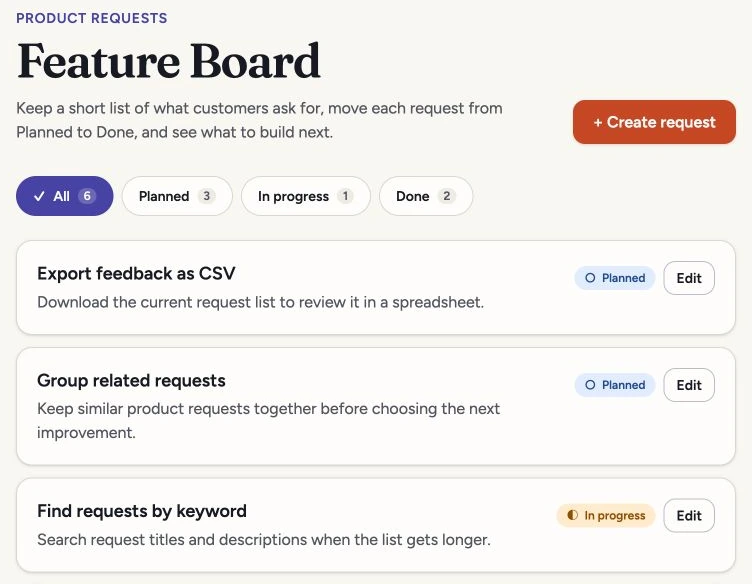
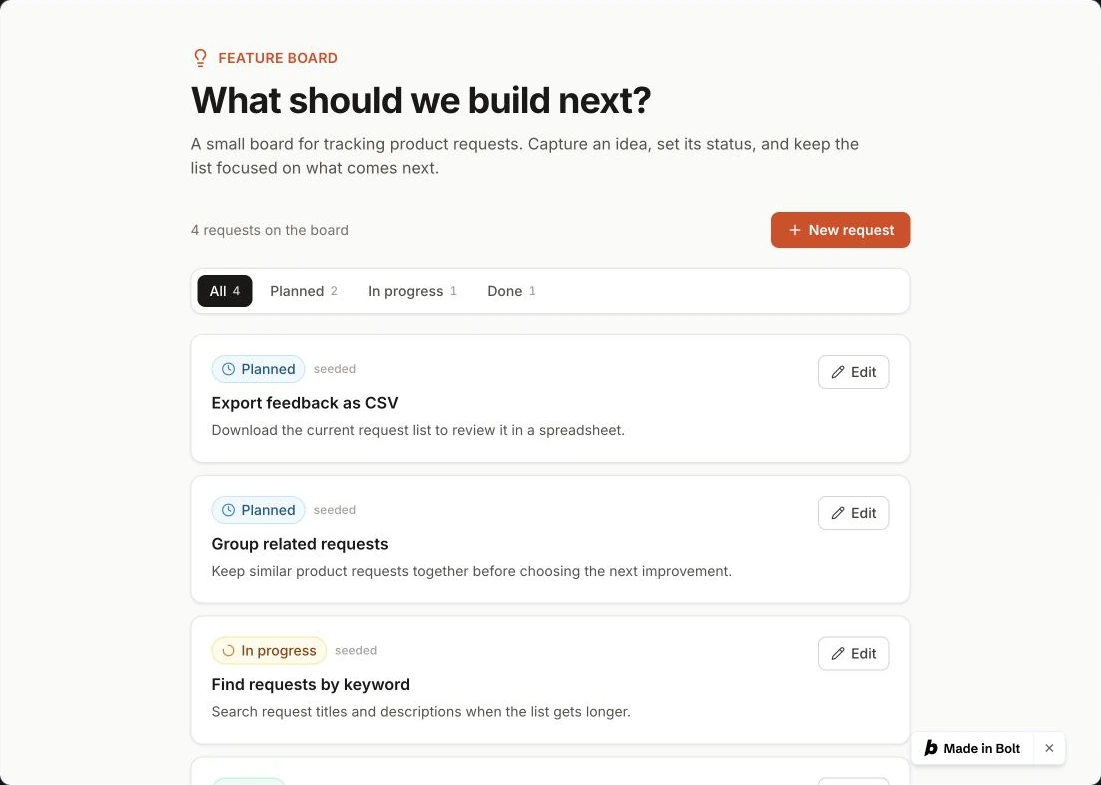
Inspect the data in the first handoff
The brief asked for four example requests. Bolt handed over those four, with the right statuses. Lovable included them too, but left two extra test requests in the board. Neither app added another copy of the examples when the page reloaded.
That is one handoff, so it doesn’t make Bolt the more reliable platform overall. It does give you a useful check: before adding your own data, count the examples and look for anything the builder left behind. A tidy interface can still contain test data you didn’t ask for.
Did the app actually save the changes?
Yes, for the requests followed through these checks. In each app, a fictional request was created, edited and checked again after a page reload. The changes were still there. The saved requests and edited statuses also appeared in the builder’s database tables, so the check went beyond seeing a success message in the interface.
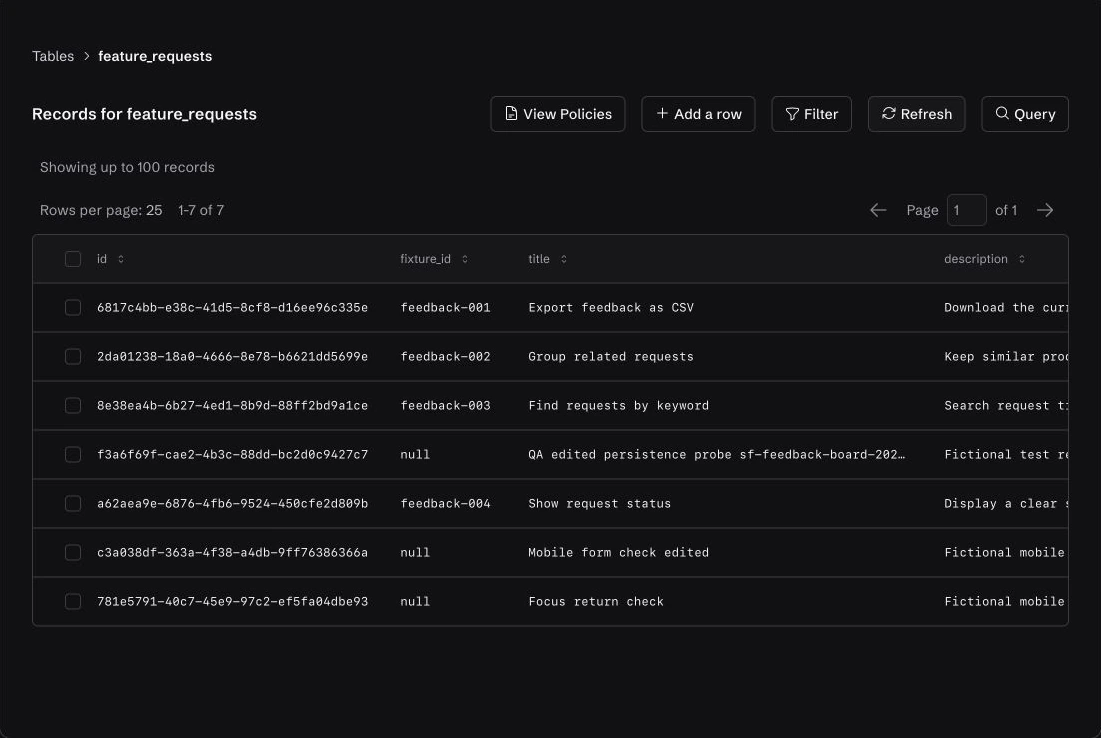
Refreshing the page is a start, but a browser can remember data without ever sending it to a server. If the builder gives you a database-table view, look for your request there too. Use a unique fictional title or keep its record ID so you can find the exact version you saved.
Access from a separate browser session is still an open question. Lovable denied that session access to the private preview; Bolt’s standalone preview would not connect. Neither result tells us that the database failed. The tests also did not force a genuine failed save or failed data load, so recovery from those errors remains untested.
The correction work after the first draft
Both apps handled the title checks, let you cancel an unsaved edit and saved status changes. If an edited request no longer matched the selected filter, each explained why it had disappeared from that list.
Both apps could also lose the keyboard user’s place after the form closed or a change was saved. Focus landed away from the controls needed to continue. Each tool fixed the tested cases after one specific follow-up prompt, returning focus to the action button or another visible control when that button was no longer available.
Lovable opened its editor in a modal dialog; Bolt put the form inside the page. Those layouts need different keyboard behavior. For either one, a person using Tab should be able to see where they are and carry on after closing or saving the form.
Give the builder the exact behavior to fix, and tell it what to leave alone:
When I cancel the request editor, keyboard focus disappears instead of returning to the button I used to open it. Fix focus return for Cancel and successful Save; if that button is no longer visible, choose a sensible visible fallback. Preserve the existing records, database, working features and design. Do not add services, charges or publication.
This example is adapted from the focus corrections in the comparison. After the change, repeat Cancel and Save with the keyboard to see whether it worked.
Use the form at phone width
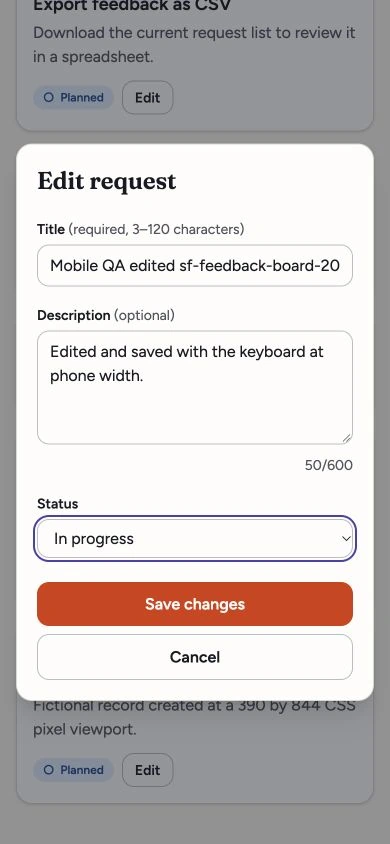
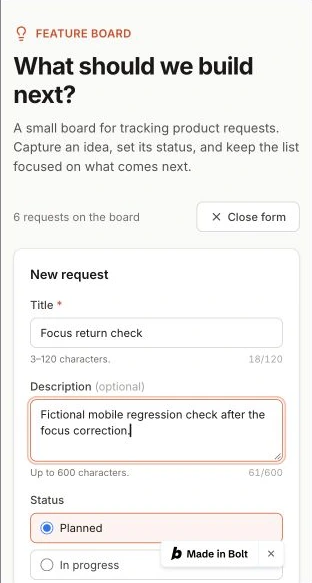
At 390 pixels wide, both apps let you create and edit requests, and neither final view had measured horizontal page overflow. The browser viewports had different heights, so the conditions were not identical. These checks did not use physical phones or cover complete accessibility or reduced-motion support.
For your own trial, do more than resize the homepage. Open the form, enter text, trigger a validation message, change status and save. Check that the labels, error and action buttons stay readable and reachable.
Compare plan costs and allowances
A subscription buys an allowance, not a guaranteed number of finished apps. Budget for the corrections after the first build, then check what it costs to keep the app running.
Sources checked October 17, 2026: Lovable plans, Lovable credits and usage, Bolt pricing and Bolt token rules. Check the account and checkout you will use for taxes, currency, plan configuration and available offers. Lovable’s 100-credit annual Pro tier costs USD 250 billed annually; that is a different commitment from USD 25 month-to-month.
Building and running are separate budget questions. Lovable describes its current Cloud and app-AI grants as temporary. Bolt’s hosting rules say a published site can stop displaying publicly after its hosting allowance is reached, until the cycle resets or limits are increased. Check the running allowance for the app you intend to launch.
What this app used in each tool
Lovable showed 4 Build credits used after the first build and 6 after the correction. That account had a special timed bonus, so those numbers do not represent an ordinary Free-plan trial. Run usage showed zero, but the interface warned that reporting could be delayed. You should not read that as free backend usage.
Bolt’s rounded Free-account balance fell by approximately 102,000 tokens after the first build and approximately 197,000 across the build and correction. Those figures come from account balances, not a task-by-task invoice, and other account activity could not be ruled out. The project stayed on Standard. Max is paid and was not tested; the exact underlying model version was also not confirmed. Bolt’s agent-selection documentation explains those labels.
Do not convert those tokens into Lovable credits or use them to name a cheaper builder. Note your starting balance and daily limit, then check what remains after the first working version and each correction. Decide how much more you’re willing to spend before continuing, including any upgrade or top-up.
Ask for a plan before a larger change
Before asking the builder to add accounts or replace the database, ask it to explain the proposed changes. Both tools offer planning modes, but planning can still use your allowance. Lovable separates Chat, Plan and Build: a Plan message costs one credit plus any subagent research, with implementation charged separately. In Bolt, starting Plan Mode from the homepage first creates a base app structure. These details come from the documentation; planning quality was not part of this test. Sources: Lovable Plan mode and Bolt Plan Mode.
Code control and moving the app later
Before a developer takes over—or you move the app elsewhere—check exactly what you can take with you. Being able to read a file is different from editing it, downloading the whole project or moving the database.
Lovable requires a paid plan to edit code inside the builder or directly download the whole codebase. Its GitHub sync is available on every plan and works in both directions. The Free account in this test could read Code view and copy or download one package.json file. A complete project export was not tested.
Bolt documents direct Code-view editing without agent tokens, including after the Free daily cap; Safari’s Code view is read-only. The test reached the package file and a Download menu, but did not include manual code edits. Its Git integration documents working with repositories inside and outside Bolt. We did not complete a whole-project export, repository sync or off-platform deployment in either run.
Taking the code with you does not automatically move the rest of the app. You still need a plan for database records, stored files, credentials and deployment settings. Lovable’s database export conditions are separate from its source-code access. Bolt documents a Claim flow on Pro or Teams for a Supabase organization owner. Replacing the database connection is different and may lose data. We did not test either migration.
If you plan to buy a UI kit, check its framework and licence before importing it. The two projects generated here used different React setups; a design file is also different from an installable component library. Our dashboard UI-kit guide separates Figma files from code libraries.
If you want to reuse your own design system, Lovable documents a native React-system workflow on paid plans; Bolt’s native workflow for adding your own system requires Teams. These plan distinctions come from Lovable’s subscription documentation, Lovable’s design-system documentation, Bolt’s design-system documentation and the Bolt token guide. Lovable’s native workflow that wraps an existing npm package is Enterprise-only; that does not mean ordinary npm-component use always requires Enterprise. These rules tell you which plan you need; they don’t tell you which tool will implement your design better.
Copy a brief for your own trial
Create a fresh development project in Lovable or Bolt. Check the allowance shown in your account, then copy the text below into the new-project prompt box. If you try both, use the same text in each.
Use fictional requests, not customer data. This is a shorter version of the detailed brief used in the comparison, so treat it as a practice project rather than a promise of the same result or build cost.
Check this before buying more credits
- Inspect the initial records. There should be four examples and no extra test rows. Reload once and check that they are not duplicated or reset.
- Follow one saved request. Create a fictional request called “Trial save check,” change its title and status, and reload. If a data-table view is available, find the saved record there too. Reload retention alone could still be browser-local storage.
- Try cancellation and a changing filter. Submit a blank title, cancel an unsaved edit, then save a status change that moves an item out of the selected filter. You should understand what happened without guessing where the data went.
- Use the actual form at phone width. Enter text, trigger an error, save an edit and reach the buttons. Use Tab to check visible focus and where it goes after Cancel or Save.
- Limit correction work. Set a budget before continuing—for example, two specific follow-up prompts within your remaining allowance. Keep a record of the first result and describe the behavior you want fixed. Stop and reassess if the allowance runs out or the same problem persists.
- Keep the launch decision separate. A development demo without login or permissions is not ready for private customer data. Implement and check the access rules and genuine failure behavior your app needs before a real launch.
Choose the next useful step
If v0 is also on your shortlist, read Lovable vs v0 for the integrated-backend versus Next.js workflow choice, with real change and failed-save checks.
Try one small workflow before investing in a larger app. Both tools completed this feedback-board task with saved data. Start with Bolt if free manual code editing is essential, using a supported desktop browser. Lovable is also worth a trial if building through prompts fits your workflow and you accept that in-app code editing requires a paid plan.
Check any must-have workflow before paying: direct code edits, your own design system or a move off the platform. Before real customers use the app, also check who can access the data and what happens when a save or data load fails. This small test did not settle those questions. If neither tool fits your workflow, compare the other app builders and coding agents in our broader guide.

Affiliate Disclosure: Some of the links in this article may be affiliate links, which can provide compensation to me at no cost to you if you decide to purchase a paid plan. This site is not intended to provide financial advice and is for entertainment only. As an Amazon Associate I earn from qualifying purchases.