
Choose AI marketing tools around the work you need to do. Surfer helps with search-focused articles; Framer and Webflow help build and maintain campaign websites. Start with the missing part of your campaign, then check the plan and the work you will still need to do yourself.
A useful split: improve a search article with Surfer; evaluate Framer or Webflow when you need a campaign page or content website. If your offer is still unclear, work on the message first.
| Tool | Where it helps | First cost check | Before choosing |
|---|---|---|---|
| Surfer SEO | Draft or refresh search-focused articles with optimization guidance and AI writing assistance. | Discovery: €59 monthly for 10 documents, or €588 upfront per year for 120 documents. | Discovery has no AI prompt tracking. You still need sources and editorial judgment; a score does not guarantee rankings. |
| Framer | Create and refine a campaign website on a visual canvas with AI assistance and a CMS. | Basic: $10/month on the yearly public display, billed at $120/year. Editors, extra AI credits and add-ons can add cost. | Check the pages and CMS limits, edit the generated result, and verify that your visitor action reaches its destination. |
| Webflow | Build a visual website with reusable layouts, structured CMS content and plan-dependent AI tools. | Basic: $180/year without a CMS. Premium: $300/year with a CMS. A free Starter Workspace may cover your setup; required upgrades add cost. | Choose a CMS-capable plan if you need a blog. Confirm AI access and credits, editing responsibilities and form delivery. |
Public displays checked October 17, 2026. Framer’s source shows a dollar sign without an ISO currency code; regional displays can differ. Confirm currency, tax, renewal terms and required extras at checkout. These are subscription amounts, not the full cost of producing a campaign.
Sebastian personally recommends all three tools. The task and cost guidance is editorial analysis of current documentation and the linked assessments, which explain their evidence and limits.
Start with one campaign brief, then read the relevant assessment before subscribing.

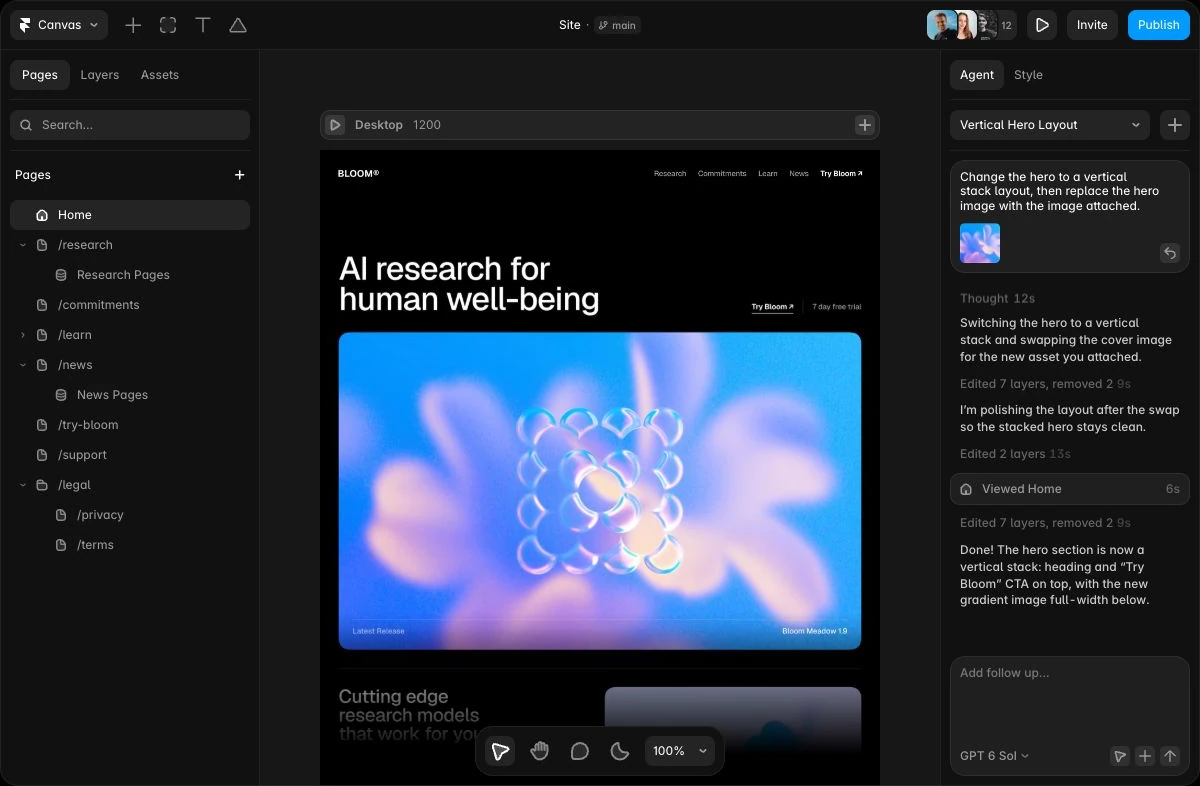
Framer combines a design canvas with vector tools, reusable components, AI agents, a CMS and hosted publishing. It suits designers and small teams who want to shape the live website visually and maintain it in the same app.
Public USD yearly view: Basic $120/year; Pro $360/year. Extra seats, locales, AI credits, Convert and applicable tax can increase the total.
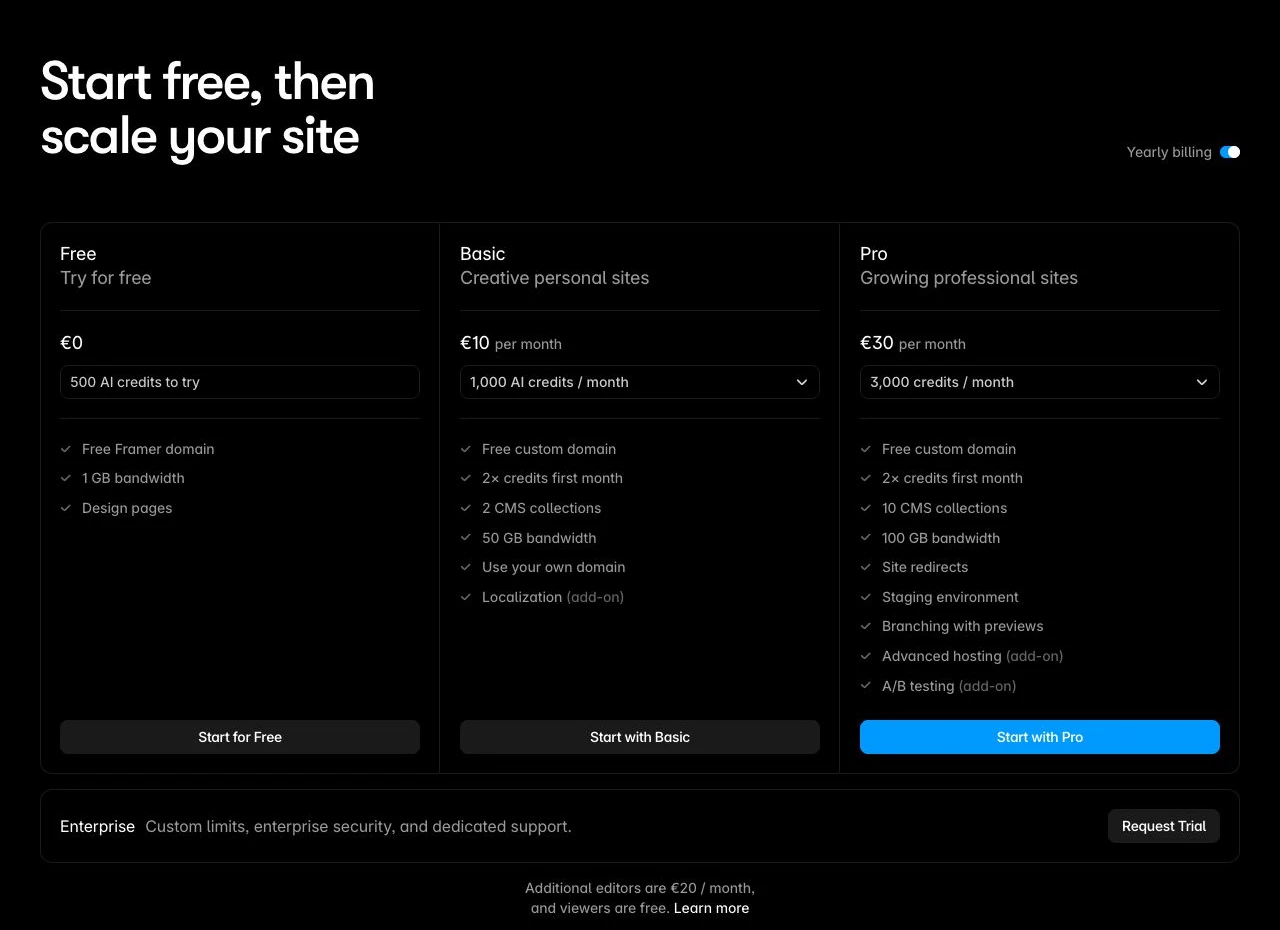
Choose Framer when its design canvas suits how you work and its CMS, visitor action and ongoing cost fit the site. Try one real page and three posts before committing. Confirm a working route first if independent hosting is mandatory.

Surfer combines a Content Editor with AI assistance and plan-dependent optimization and visibility monitoring. Shortlist it for an existing article pipeline where someone can judge the suggestions.
Use the worked budgets and article review sheet to check peak document use, the billing commitment and the work left for you.
EUR annual display checked October 29, 2026: Discovery €49/month equivalent, €588 upfront for 120 documents/year; Standard €99 equivalent, €1,188 upfront for 360; Pro €182 equivalent, €2,184 upfront for 360. These are yearly subscriptions, not monthly billing quotes. Confirm current monthly offers, currency, tax, renewal terms and required features in checkout.
Shortlist Surfer when you have search-focused articles to draft or refresh and can review its suggestions. Match the features to the task, then count both annual usage and the busiest month. The budget examples and copyable article review sheet help you evaluate that decision without treating a higher score as a business result.

Webflow combines a visual HTML/CSS website builder, structured CMS content and hosted publishing. Sebastian uses it for client websites where technical control and a maintainable structure matter. Model the content, editing roles and visitor action before choosing a package.
Public USD pricing checked October 28, 2026, before applicable taxes. Basic: $15/month billed yearly ($180/year), or $25 billed monthly; excludes CMS. Premium at the default 50 GB selection: $25/month billed yearly ($300/year), or $39 billed monthly; includes 20,000 CMS items and 40 collections. Free Starter Workspace available. Freelancer Workspace: $16/month billed yearly ($192/year). Additional seats, localization, analytics, bandwidth, apps and other add-ons can increase cost. Existing legacy billing may differ.
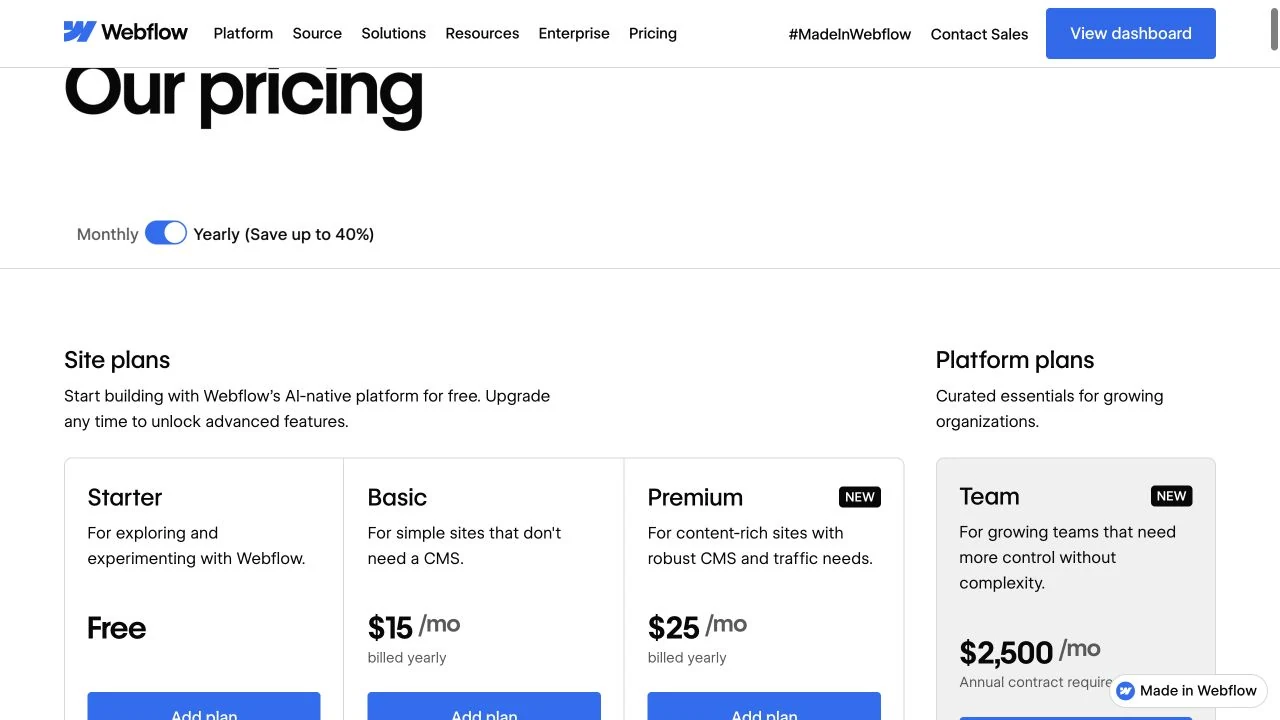
Choose Webflow when reusable CMS content and control over site structure justify the setup and ongoing maintenance work. Check one representative content type and the intended editor role, then price the required Site plan, Workspace and extras together.
Pick the bottleneck first. If a campaign page already explains the offer and receives inquiries correctly, rebuilding it may add little. If that page is missing, an article-optimization subscription is unlikely to be the first useful purchase. Once you have a clear destination for readers, decide whether a repeatable search-content workflow is part of the plan.
This selection covers content optimization and campaign websites. Email automation, video production and ad buying need their own requirements and evidence. Adding more products does not establish a better marketing system.
The following is a hypothetical planning example for a small scheduling app. It is a brief to adapt, not a campaign we have run or a measured result.
Audience: Independent tutors who coordinate lessons and rescheduling by email.
Offer: A scheduling app that lets a tutor publish available lesson times.
Visitor action: Request an invitation through one form; the submission must reach the person responsible for replying.
Website requirement: One campaign page. Add a blog only if publishing useful articles is part of the plan; record the required CMS collections and editor access.
Content requirement: Draft one guide answering a real scheduling question. List the facts, screenshots or original examples you can contribute before asking AI to write.
Acceptance: The offer is understandable, the page works on a phone, the form delivers, and the article helps the intended reader. Record the editing work and required subscriptions separately.
For the website task, give Framer and Webflow the same pages, content and visitor action. Our Webflow versus Framer comparison explains the plan and maintenance tradeoffs. For an existing article, use the Surfer evaluation checklist and budget examples to judge accepted and rejected suggestions.
AI can supply a draft, suggest changes or generate sample content. It cannot establish whether your offer is true or whether a reader finds it useful. Replace invented examples, verify claims and check the actual published page and visitor action.
Price the job you will do. Surfer document allowances, Framer AI credits and Webflow AI credits are different units; their headline numbers do not measure the cost of a finished article or website. A content workflow may also require research, editing, hosting and ongoing maintenance.
Sources: Surfer pricing; Framer AI and plans; Webflow AI and plans.
Choose one marketing job and make the next action work. Use our landing-page guide to sharpen the message, the website comparison to assess the publishing setup, or the Surfer assessment to budget a search-content workflow. Expand the stack when you can name the next problem it must solve.
Disclosure: Some product links are affiliate links. We may receive a commission from a qualifying purchase. Personal use, documented tests and source-based assessments are identified where stated; inclusion alone does not mean a product was personally tested.