

To create a landing page, start with one audience, one offer and one primary action. Explain what visitors will receive, show evidence that helps them judge it, and make the next step clear. Then check that the page and the process behind it work.
A landing page is a focused destination for a campaign or offer. It might ask someone to request a demo, join a waitlist, buy a product or enquire about a service. A conversion is the action you choose to measure. Whether the page converts well depends on the offer and traffic; a particular layout does not guarantee results.
You need a real offer, the promise made by the link or ad sending visitors, and a way to deliver the next step. Use the example below to plan your page, then copy the landing-page brief and fill it with your own facts.
For a B2B SaaS offer, use the SaaS marketing plan to choose the customer, trigger and channel before writing the page.
1. Choose the action your page needs to support
Write what the right visitor should do and what they receive afterwards. “Get more leads” is a business objective. “A SaaS founder sends a homepage URL so we can quote a review” gives the page a specific job.
| Offer | Primary action | What must happen next |
|---|---|---|
| A service with a scope to agree | Request a quote or send an enquiry | The enquiry reaches the right person; the visitor knows how the scope will be agreed. |
| A product that needs a demonstration | Book a demo | A real booking step offers an available appointment and confirms it. |
| A product that is not available yet | Join the waitlist | The request is recorded and the page explains what updates to expect. It does not imply immediate access. |
| A product ready to purchase | Buy the stated product | The checkout, payment confirmation and delivery match the offer and its conditions. |
Swipe the table to read all three columns.
You can repeat the same action further down a long page. Keep other links when they help someone evaluate the offer, find terms or get support. Removing every navigation link is not a universal rule.
2. Match your headline to the offer visitors came for
Carry the promise from the ad, email or post into the page. If the link offers a homepage review, do not send people to a general agency page that makes them search for it. Google Ads recommends matching the destination to the ad and its call to action.
Draft the first screen with three parts:
- Headline: the specific offer or job, in language your intended customer understands.
- Supporting copy: what is included, who it is for and any condition that changes the decision.
- Call to action: what the visitor can actually do next.
Make the promise visible: Plausible
These current-page examples illustrate design decisions, not verified conversion results.
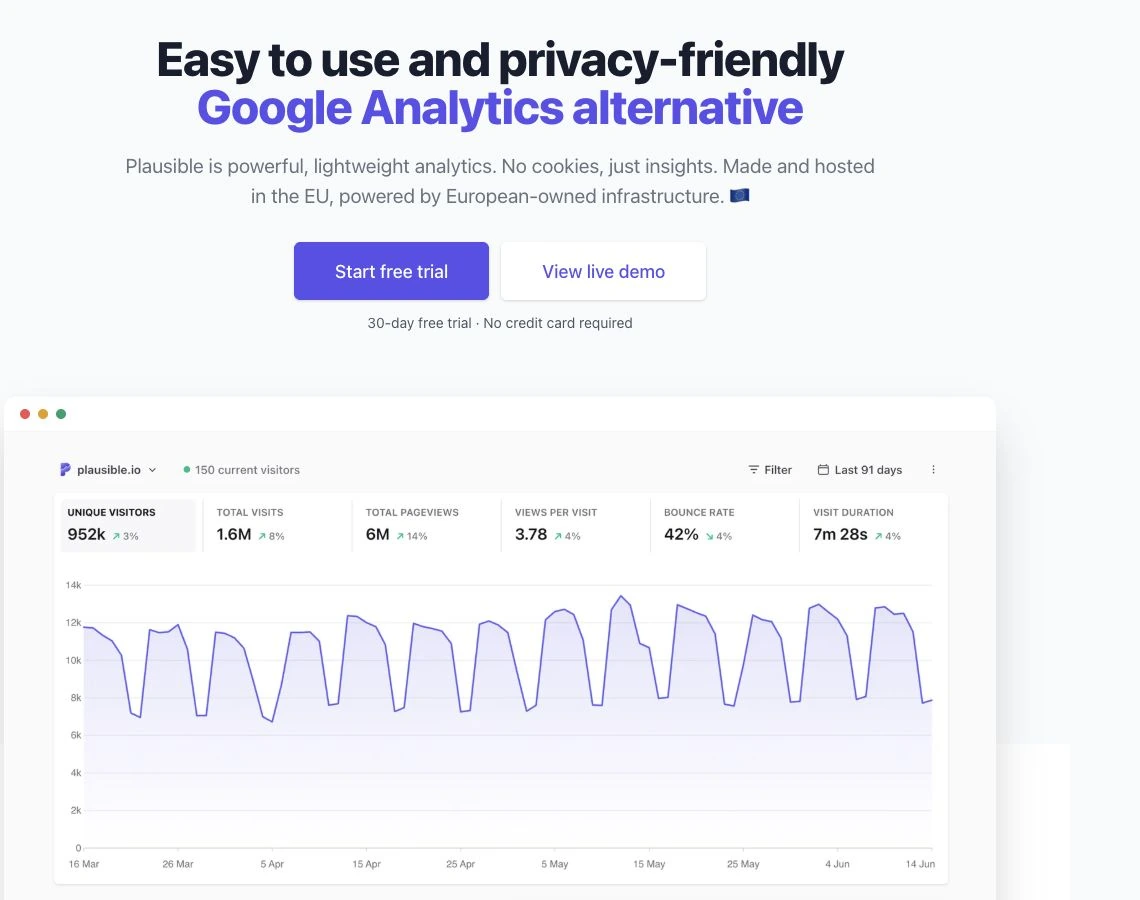
Plausible names a familiar category—an alternative to Google Analytics—and puts a dashboard preview close to the promise. Visitors can start a trial or inspect a live demo. Those actions offer different levels of commitment.
Show the output that helps someone understand your offer. For the homepage-review service below, a real annotated review sample would explain the deliverable better than a decorative illustration. Add a second action only when it answers a separate visitor need; two buttons are not a rule to copy.
For example, “We help businesses grow” leaves the service unclear. “Homepage reviews for bootstrapped SaaS founders” names an audience and a deliverable. It is more specific; whether it sells better needs separate evidence.
3. See how the copy fits together
Imagine a small design studio offering homepage reviews. The studio accepts an enquiry first, then agrees the scope and price. This is a fictional service example, not a customer case study or a live offer.
EXAMPLE COPY · FICTIONAL SERVICE
Homepage reviews for bootstrapped SaaS founders
Get annotated feedback on your offer, page flow and signup journey. Send your homepage URL; we’ll agree the review scope and price before you book.
CTA copy: Ask about a homepage review
Beside the form: Share your email and homepage URL. We’ll use them to reply about the review. Submitting an enquiry does not book or purchase it.
- The offer is concrete: annotated feedback, rather than an unsupported promise of more revenue.
- The commitment is clear: an enquiry comes before agreement and payment.
- The button matches the process: it asks about a review; it does not pretend a call is already booked.
For a real version, show an actual annotated review sample and explain the scope, turnaround and terms you can provide. A borrowed dashboard would not demonstrate this deliverable. If the studio changes to a fixed-price purchase, the price, button and checkout must change together.
4. Build the layout around the buyer’s questions
Arrange the content so someone can understand the offer and decide whether it fits. For the studio example, a useful starting order is:
- Offer and next step. Use the headline, supporting copy and enquiry action.
- Example deliverable. Show a real sample of annotated feedback, with permission to display any customer material.
- Scope and fit. Explain which pages and questions the review covers, and what implementation work it excludes.
- How it works. Explain enquiry, agreement, payment and delivery in the order they happen.
- Evidence and remaining questions. Add genuine relevant work, customer feedback and decision-relevant terms.
- The same next action. Let a reader who has finished evaluating send the enquiry.
Adapt that order to the offer. A simple waitlist needs less explanation than an expensive service. Include enough to answer the questions that affect the decision, rather than aiming for a universal page length.
Choose visuals that explain the offer. A real product screen can show what a SaaS tool does; a sample deliverable can show what a service includes. A decorative illustration can support the brand, but it is not product evidence.
Use genuine testimonials and claims you can support. If you have no customer results yet, show the actual product or an accurately labeled sample instead of inventing a quote or an “as seen in” logo. The FTC’s small-business advertising guidance explains the need for truthful, supported claims in the US.
State material price, billing, access and commitment conditions near the offer. Use a deadline or capacity limit only when it is real. A countdown timer does not create a reason to trust the page.
Answer the question behind the click: Basecamp
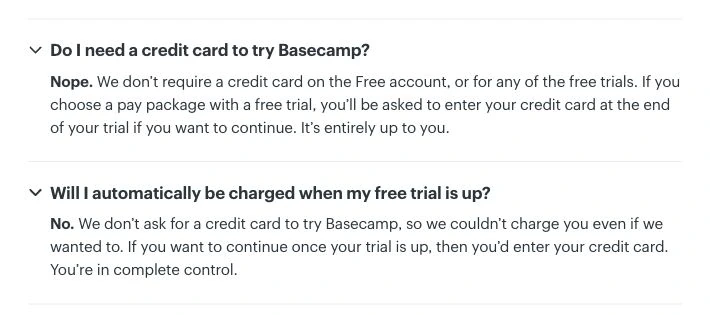
Basecamp answers two specific worries: whether a trial needs a credit card and whether it will charge automatically. These answers explain the commitment more precisely than a generic risk-free badge.
Write the condition your visitor needs beside the relevant action. For the studio, sending an enquiry does not book or purchase a review. For a trial, explain the actual payment and access rules. Use a no-card or no-automatic-charge promise only if your own process honours it.
5. Make the form and next step easy to understand
Ask for what you need to deliver the promised action. The studio needs an email address and a page URL to begin discussing a review. It does not automatically need a phone number, postal address or revenue figure. A purchase or a more complex service may need different information.
The W3C forms guidance recommends asking only for necessary information and providing labels, instructions and feedback. In your form:
- Keep visible labels; placeholder text disappears when someone types.
- Mark required and optional fields, and explain unusual input requirements.
- Identify a field error and say how to correct it.
- Show an accurate success message and the next step after the system accepts the request.
Keep the first step clear: Calendly
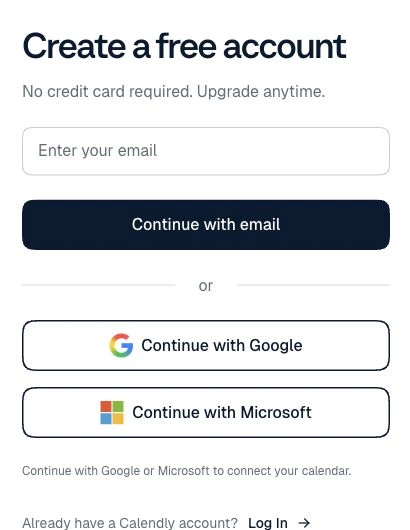
Calendly’s first signup screen asks for an email address and labels the action “Continue with email.” Google and Microsoft are alternative routes. The screen makes this step clear; it does not show the entire signup or booking process.
For each field on your page, ask why it is needed now. Move later details to onboarding when that still supports qualification and delivery. A service quote may need scope or location before anyone can reply usefully; copying a one-field screen would not solve that requirement.
For the fictional studio, success copy could say: “Your enquiry was sent. We’ll reply to the address you provided to discuss scope and price.” Use that wording only if the request was accepted and that is the actual follow-up. If you promise a response time, make sure you can meet it.
On a real phone, check text size, tap targets, keyboard behavior, error messages and the full form. Keep the page within the screen width and images in proportion. Reading a narrow desktop screenshot is not the same as trying the form on mobile.
6. Copy this landing-page brief
Fill this in before picking a template. Give the completed brief to your designer, use it in a builder or use it to revise an existing page. Replace unknown claims with questions to resolve.
LANDING-PAGE BRIEF

Audience: [one specific type of customer]
Problem or job: [what they need to do]
Traffic source: [ad, search, email, partner or other]
Entry promise: [the actual ad or link wording]

Offer: [what the customer receives]
Included / excluded: [the scope]
Price and commitment: [verified cost, billing or enquiry terms]
Proof available: [real screen, sample, work or approved quote]
Main unanswered objection: [the decision-relevant concern]

Headline: [specific offer or job]
Supporting copy: [deliverable, audience and key condition]
CTA: [the actual next action]
Required form fields: [only what the next step needs]
After submission: [accepted state, delivery and follow-up]

Page sections: [order that answers the buyer’s questions]
Completion to measure: [the accepted action, not just a click]
Still to verify: [facts, terms or workflow gaps]
For the example above, “offer” is an annotated homepage review; “price and commitment” is an enquiry followed by agreement; “proof” could be an actual sample review. If there is no sample yet, creating one is useful work before publishing a claim about the quality of the service.
7. Use AI to draft and challenge the copy
Use your completed brief as the input. The useful output is a few copy options and a list of unclear or unsupported statements—not an invented customer story or a conversion score. Remove private customer information before pasting examples into an AI tool.
Use only the factual brief below. Write three headline and supporting-copy options, plus one CTA for each. Match the entry promise and explain what happens next.

Do not invent features, prices, customer quotes, user counts, deadlines or results. Mark missing facts [needs evidence].

For each option, flag any unclear terms, unsupported claims, mismatches with the entry promise or unanswered objections. If none are apparent, say so. Suggest a concrete fix for each issue you find. Do not predict a conversion rate or call an option a proven winner.

Brief: [paste the completed landing-page brief]
Compare every statement with your real offer and evidence. Read the copy aloud and ask a likely customer to explain what they would receive and what the button does. That can expose confusion; it does not measure a conversion lift.
8. Build the page with the requirements in view
If your current website platform can deliver the layout, form and follow-up, start there. Switching tools is not a substitute for clarifying the offer. Check mobile editing, form destinations, domain requirements and the relevant plan limits before committing.
For a standalone page, the Typedream review and Mixo AI review explain their plans and limits. For a broader shortlist, use the AI website-builder comparison with your completed brief.
If organic search is part of the plan, make the page useful for the searcher’s actual task, with a descriptive title, clear heading and crawlable links. Google’s SEO Starter Guide covers those fundamentals. Repeating a keyword is not a shortcut to rankings.
9. Check the journey, then improve from evidence
Before sending traffic, follow the same path a visitor would take:
- Open the real entry link. Does the page fulfill its promise?
- Read the offer. Are the deliverable, conditions and next step clear?
- Try the error path. Can a visitor understand and correct a missing or invalid field?
- Send a test request or use the checkout’s test mode. Verify that the actual enquiry, signup, booking or order reaches the intended system.
- Check the promised result. Confirm the relevant reply instructions, appointment, access or delivery. Repeat the important steps on mobile.
Track the CTA click separately from the completed action. An enquiry button click does not prove an enquiry arrived; a waitlist request is not a paying customer. For a visit-based conversion rate, divide visits with at least one accepted target action by all eligible page visits in the same period. Use the same visit definition, count a visit once in the numerator and exclude staff tests consistently. Qualify enquiries and attribute revenue separately.
There is no useful universal “good conversion rate” without the offer, traffic source and completion definition. A purchase, a low-commitment waitlist signup and a qualified enquiry are different outcomes. Compare like with like rather than adopting an unrelated benchmark.
If you have enough traffic for an experiment, write a specific hypothesis and define the primary outcome before you start. Randomly assign eligible visitors to the versions, check the tracking and plan the sample and analysis. The GOV.UK guide to A/B testing explains those design steps. A before-and-after comparison alone does not isolate the effect of a new headline.
A reported test of message match
In a Campaign Monitor paid-search campaign, ConversionLab tested matching a landing-page verb to the search query against fixed copy. Unbounce’s 2018 report describes 1,274 visitors across the variants over 77 days and a 31.4% relative lift in completed software-trial signups. The goal was the signup after the landing-page click, rather than the click itself.
This is a historical vendor-reported result, not a forecast for your page; exact variant counts and absolute rates are not provided. Apply the test logic to a specific promise: keep a homepage-review campaign focused on that service, then measure accepted enquiries rather than button clicks.
With low traffic, watch likely customers try the task. Fix a broken action first. If they cannot explain the offer or commitment, fix that copy next. If they understand it but hesitate, investigate the missing evidence or objection before redesigning the page. Use a controlled experiment when the traffic and measurement can support one; a few clicks do not establish a winner.
Your next step: fill the brief, write the first screen and check the next action. You will have a page built around an actual offer, plus a specific question to investigate when visitors arrive.

Affiliate Disclosure: Some of the links in this article may be affiliate links, which can provide compensation to me at no cost to you if you decide to purchase a paid plan. This site is not intended to provide financial advice and is for entertainment only. As an Amazon Associate I earn from qualifying purchases.