

A free shadcn dashboard can give your app a sidebar, tables and forms before you write the first account-management screen. The useful question is how much of that screen already works—and whether the project fits the stack you want to keep.
For an existing React/Vite app, look at Sat Naing’s shadcn-admin as a UI reference you can adapt. For a Next.js project where you want a defined service, query and form structure, consider Kiranism’s dashboard starter. For a Next.js starting point focused on reusable admin screens, inspect Bundui’s Shadcn UI Kit Free.
The difference became clear when we checked the supplied demos: Sat Naing’s user-edit form showed a submitted-values message without changing the row; Bundui’s “Add New User” link did not open a form. Kiranism’s protected route needed Clerk configuration before it could run. All three original production builds passed.
Evidence, October 30, 2026: Codex ran the three pinned source copies, then adapted the same five fictional trial accounts and checked desktop/mobile browser views. These are agent-executed tests, not Sebastian’s personal use. Kiranism’s functional trial used its documented Clerk-removal option, so it does not verify the original authentication, organizations or billing.
Which free shadcn dashboard fits your project?
These projects sit above individual components: they provide a dashboard shell and example screens you can use as a starting point. They are different from Figma-only kits, marketing-page blocks and hosted app builders. Sat Naing also explicitly describes shadcn-admin as a showcase rather than a starter template; treat its code accordingly.
| Decision | Sat Naing shadcn-admin | Kiranism starter | Bundui Free |
|---|---|---|---|
| Project foundation | React/Vite, TanStack Router. | Next.js App Router, with feature-based service/query/form conventions. | Next.js app with a free admin area and reusable UI examples. |
| Table and form pattern in the tested source | TanStack Table 8, React Hook Form and Zod. | TanStack Table 9, React Query, nuqs and TanStack Form; Base UI components. | TanStack Table 8, React Hook Form and Zod. |
| Supplied Users behavior we checked | Edit submission displayed a toast; the original row stayed unchanged. | Protected route could not run without Clerk keys. The original build still passed. | Table and name filters rendered; Add New User linked to #. |
| Our trial’s data handling | Added local React-state updates. | Added an in-memory trial service with query invalidation, in the auth-free variant. | Added local React-state updates. |
| A sensible fit | You want an admin UI reference without moving a React/Vite app to Next.js. | You want its Next.js conventions and are willing to configure or deliberately remove integrations. | You like the free screen styles and want to build your own workflow around them. |
| Work still required for a real app | Connect data, saves and access rules; review optional integrations. | Choose the real service/backend and authentication setup; our Clerk-free demo is not a secured app. | Implement the account workflow, data layer and permissions behind the UI. |
No premium component or new remote account was required for our adapted task. That does not include hosting, a coding-agent subscription or the backend/authentication services you may choose.
If you need to design the dashboard before coding it, use the dashboard UI-kit guide. If your app already has its structure and only needs controls, compare shadcn/ui, Untitled UI React Free and daisyUI instead.
The same account-management screen, built three ways
The task was a small trial-account list. Five fictional workspaces had an owner, a trial day, a last completed step and an activation status. Four had not reached their first useful result. One had an intentionally long name; another, Demo Gamma, had no assigned owner.
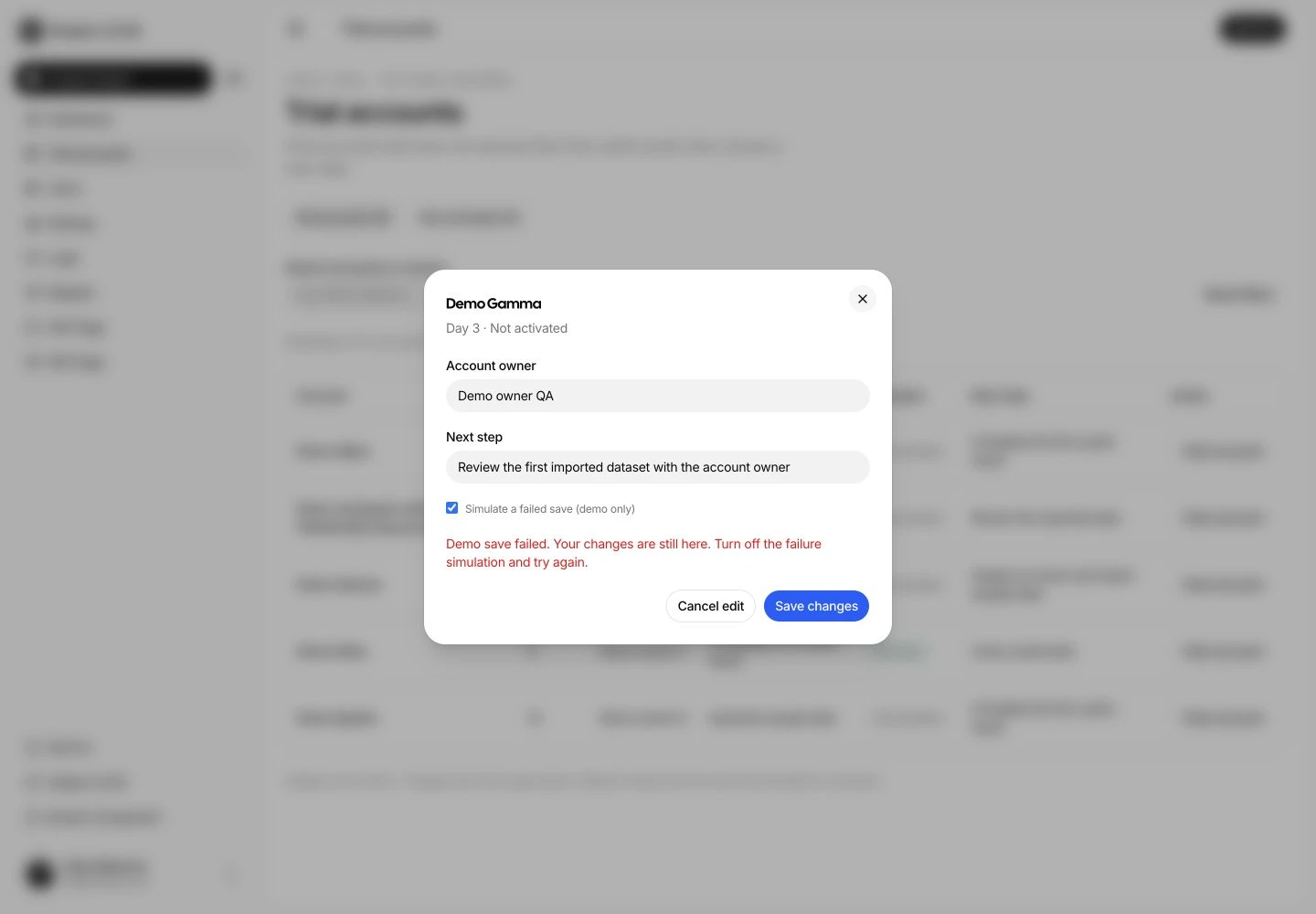
Each adaptation had to show all five accounts, filter to the four not activated, open Gamma’s details, return to the filtered list, handle an empty search and reset to all five. We then added a next-step column and validated field, changed the primary color and checked a deliberately failed save.
All three adapted builds completed that sequence. A retry updated the local list, and reloading restored the sample records. Those are working prototype interactions, not durable database saves. The original sources were captured before adaptation; the screenshots below show the resulting custom trial screens.
Sat Naing: an admin UI reference for React/Vite
Sat Naing is the natural shortlist candidate here when your project is already a React/Vite app. Its supplied sidebar, table controls and form components give you a coherent admin interface without adopting Next.js to get it.
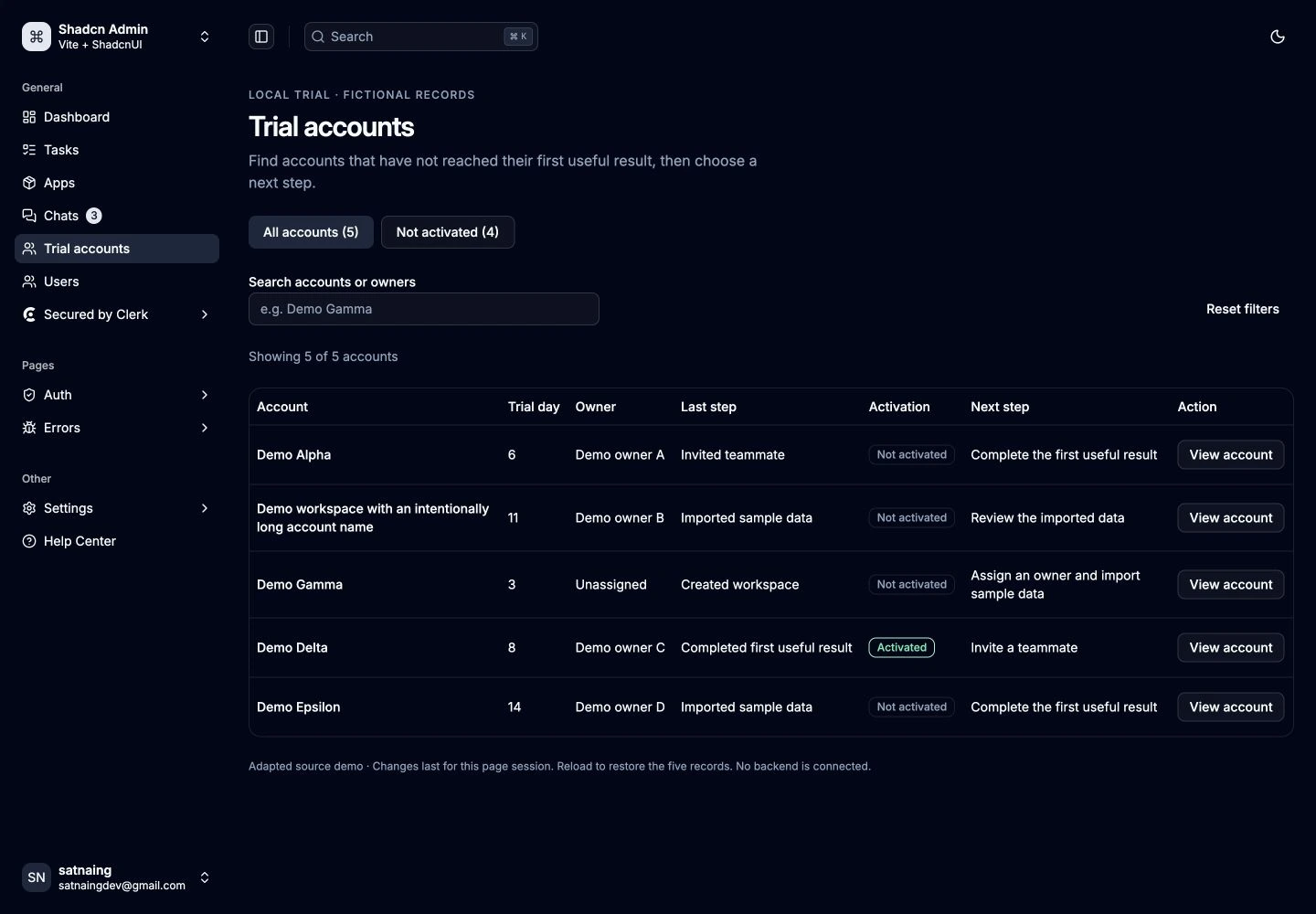
The supplied edit form is a useful example of the boundary. Its submit handler resets the form, displays the submitted values and closes the dialog. In the checked edit, changing the first name produced that feedback while the original table row remained unchanged. You can inspect the pinned handler.
For the trial, we added a separate route, mapped the five records into its table/form patterns and implemented local updates. The existing Users page was retained. The result is enough to judge layout, interaction and the next change, but your real service still needs to receive and persist an edit.
Choose it when: the React/Vite architecture is a requirement and you want source you can adapt. Don’t treat a polished demo screen as evidence that its business actions are already connected. Inspect the tested shadcn-admin source.
Kiranism: more structure, with integration decisions attached
Kiranism’s Next.js starter puts data types, service calls and query options into feature folders. Its supplied table and form conventions make those boundaries concrete. That is useful when you want a coding agent to follow an existing structure instead of introducing a different fetching or form pattern for each screen.

The original protected Users route required Clerk keys. Rather than creating an auth account, we used the repository’s documented node scripts/cleanup.js clerk option. That removes Clerk, organizations, billing and their checks from the local copy; it is a different configuration, not proof that the original authentication works without setup.
We added trial service/types/query files and server prefetch using the existing React Query, nuqs, TanStack Table 9 and TanStack Form patterns. The local in-memory service handled an update and invalidated the query so the list refreshed. Reloading returned to the fixture.
The repository also supplies agent instructions, a Claude-oriented skill and a scripted AI-chat example. The instructions give an agent specific conventions to follow. The chat example is not evidence of included model access, and this exercise did not measure agent speed or token savings.
Choose it when: you want a Next.js application structure and expect to keep or deliberately replace its integrations. If your existing app only needs a table and a dialog, importing a starter’s architecture may be more change than the screen needs. Inspect the tested Kiranism source and setup.
Bundui Free: keep the screens, supply the workflow
Bundui’s free repository includes an admin shell and example screens inside a Next.js app. Its Users page rendered a table with filters, columns and pagination. The “Add New User” link pointed to # and did not open a creation form in the checked path.
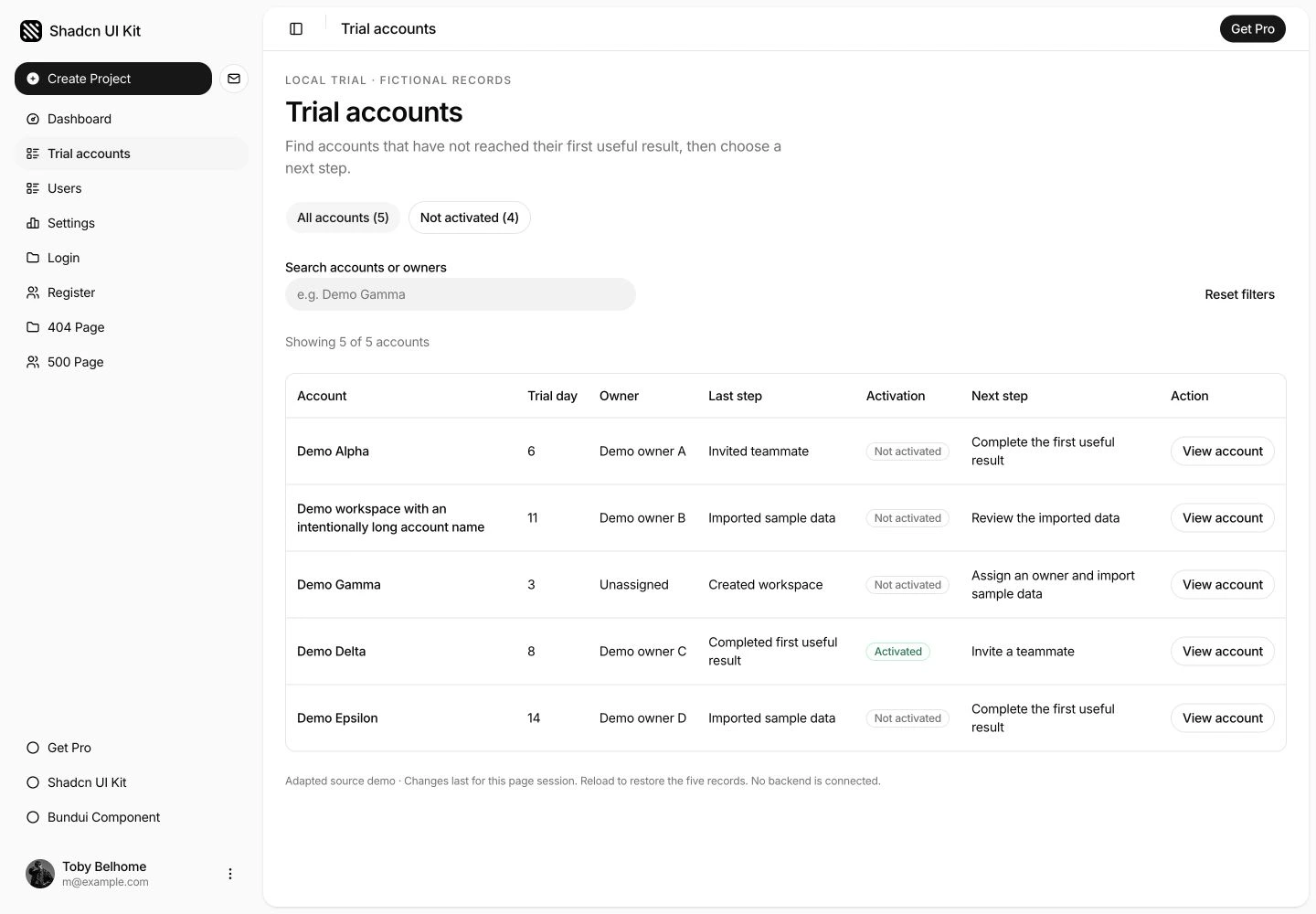
We added the trial route using the free shell, table components, React Hook Form and Zod. Search, filtering, account details and session-only updates were application code added for this task. The route also needed its header-title mapping, so it displayed “Trial accounts” rather than the default “Dashboard”.
With the pnpm 11 version used in the trial, the source’s package.json overrides field produced an ignored-configuration warning. The locked native and adapted builds still passed. If you adopt the project, review that package-manager configuration alongside the dependency lock.
Choose it when: the free admin screens are a visual starting point you want to maintain in Next.js. Plan the data and account behavior separately. Inspect the tested Bundui Free source.
What the mobile and form checks changed
The first trial adaptations kept a wide table at mobile widths. At 390px, the right-hand status and “View account” action required horizontal scrolling. That can suit some analytical tables, but it made this list’s main job harder: seeing an account’s state and opening it.
We added cards below the desktop breakpoint, keeping the table for larger screens. A card exposes the account, owner, day, last step and next action together. These cards are our adaptation, not a mobile feature supplied unchanged by all three sources.
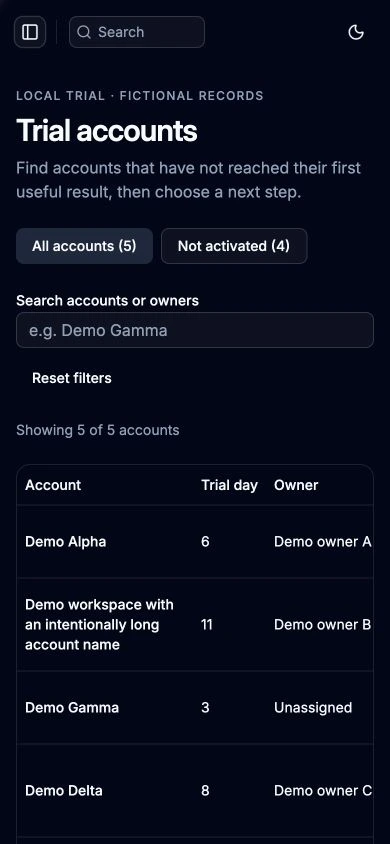
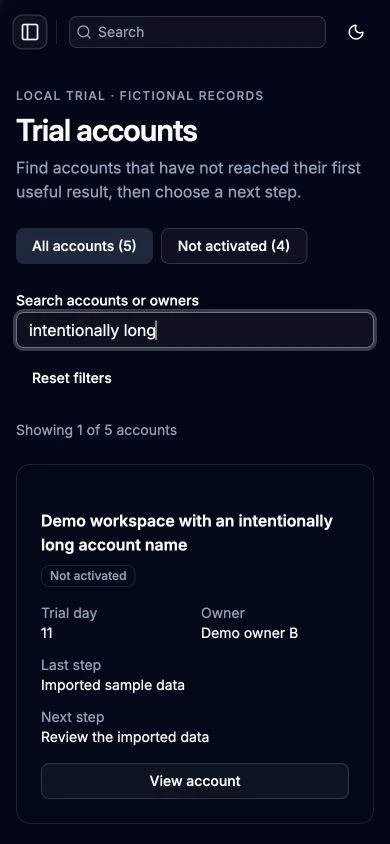
The same long-name case also fit in the Kiranism and Bundui mobile cards. A different desktop screenshot is not a substitute for this check: test the long value with the phone layout active.


The field checks exposed another distinction. The adapted forms rejected a blank owner and a one-character next step. That validates text length; it does not check a real staff directory or whether the person is allowed to own an account.

Keyboard checks also needed attention. Our custom Radix-dialog integrations in Sat Naing and Bundui initially left focus on the page body after Escape; we added explicit focus return to “View account”. Kiranism’s Base UI dialog returned focus in the observed check. In the local Kiranism and Bundui copies, we also made a selected navigation link close the mobile menu.
These repairs are worth distinguishing. The mobile cards and custom-dialog focus were integration work; they are not evidence that the original libraries ship the trial workflow incorrectly. For your own app, check the completed flow after composition, not just the components in isolation.
What “free” includes—and the costs it leaves you
The three tested repository copies carry MIT license files. No premium purchase was needed for their code or for this task. Keep the relevant notices and review dependency licenses and any separately obtained assets for your intended use:
- Sat Naing shadcn-admin: tested repository license.
- Kiranism starter: tested repository license.
- Bundui Free: tested repository license.
A free frontend is not a zero-cost application. Your project may need hosting, storage, a database, authentication and operational support. The paid editions, paid components and configured remote integrations were not tested here.
Use the source’s own README and lockfile to check setup. The trial pinned different projects rather than forcing all three into a new shared framework, so it does not support a “fastest template” or cheapest-agent claim.
Try one account workflow before adopting the dashboard
Pick the candidate that fits your framework, open a separate prototype and paste this into your coding agent. Fill in the project and chosen repository first. It asks for a finished small workflow and a real change, so you can see which parts are supplied UI and which parts you still own.
Build a small trial-account workflow in a separate prototype.

Project: [framework, versions, package manager and existing UI base]
Chosen dashboard repository and commit: [one official source]

Read its README, license, lockfile and applicable agent instructions.
Keep its existing routing, table, form and data conventions. Show what
will change before editing. Do not buy components, create remote
accounts or remove authentication without an explicit decision.

Use five clearly fictional records:
- Alpha: day 6, owner A, invited teammate, not activated.
- A deliberately long Beta account name: day 11, owner B,
  imported sample data, not activated.
- Gamma: day 3, unassigned, created workspace, not activated.
- Delta: day 8, owner C, completed first useful result, activated.
- Epsilon: day 14, owner D, imported sample data, not activated.

First document the source's unchanged list/form behavior. Then add:
all five → four not activated → Gamma detail → back to four →
an empty search → reset to five. Keep the filter when returning.

Add an editable owner and a next-step field with visible validation.
Label any local/mock saving honestly. Show the changed list after
save, then reload and report whether the change survived. Test a
clearly simulated failed save: retain input and show the error inside
the open form. Do not call this a backend test.

Check 1440px and 390px layouts with the long account name. Keep
status and the main action usable. Check keyboard opening, Escape,
focus return, mobile navigation and contained table scrolling.
Run the production build and capture actual desktop/mobile screens.

Then change one primary color token, add a longer column value and
extend one validated field. Return the actual diff, failures, repairs
and remaining work. Separate supplied UI, your adaptation and real
services. Do not invent speed, token savings or production readiness.
Need the environment that runs this work? Use the vibe coding tools guide. If the missing piece is the public SaaS website rather than the admin app, the free shadcn blocks comparison covers that separate job.

