
Relume uses AI to plan your website’s pages, choose section layouts and draft copy. Build a starting design, then refine it in Figma or Webflow and connect CMS content in Webflow. Compare Export plans by the pages you need and the billing commitment.


Plan the website before polishing its design
Relume helps you turn a marketing website brief into a page structure, section layouts and draft copy with AI. Its Export workflow is useful when you want that starting point in Figma or Webflow, with room to refine the design and build the site properly. It suits a business website or landing page; a custom application needs a different build workflow.
Why Sebastian recommends it: he uses Relume to plan the information architecture and sections, choose from its component library and develop a basic visual direction. He then refines the design in Figma or Webflow and connects the CMS in Webflow. He particularly values the AI-generated sitemap, section choices and first-draft copy. The plan and cost analysis below uses current documentation, rather than a new account-based build test.
AI connects the sitemap, sections and copy
Start with what the business does, who the site serves and the action visitors should take. Relume’s Site Builder AI proposes pages and an outline of sections for each page. Here, the sitemap is your planned website structure; it is a different job from the XML sitemap a publishing platform supplies to search engines.
Each section’s title and description guide the AI’s component choice and copy. Review those instructions before generating the wireframes: “explain our onboarding process” calls for different content from “show three pricing tiers.” You can edit the structure, swap components and use Ask AI to revise the wireframe text. The copy also remains directly editable.
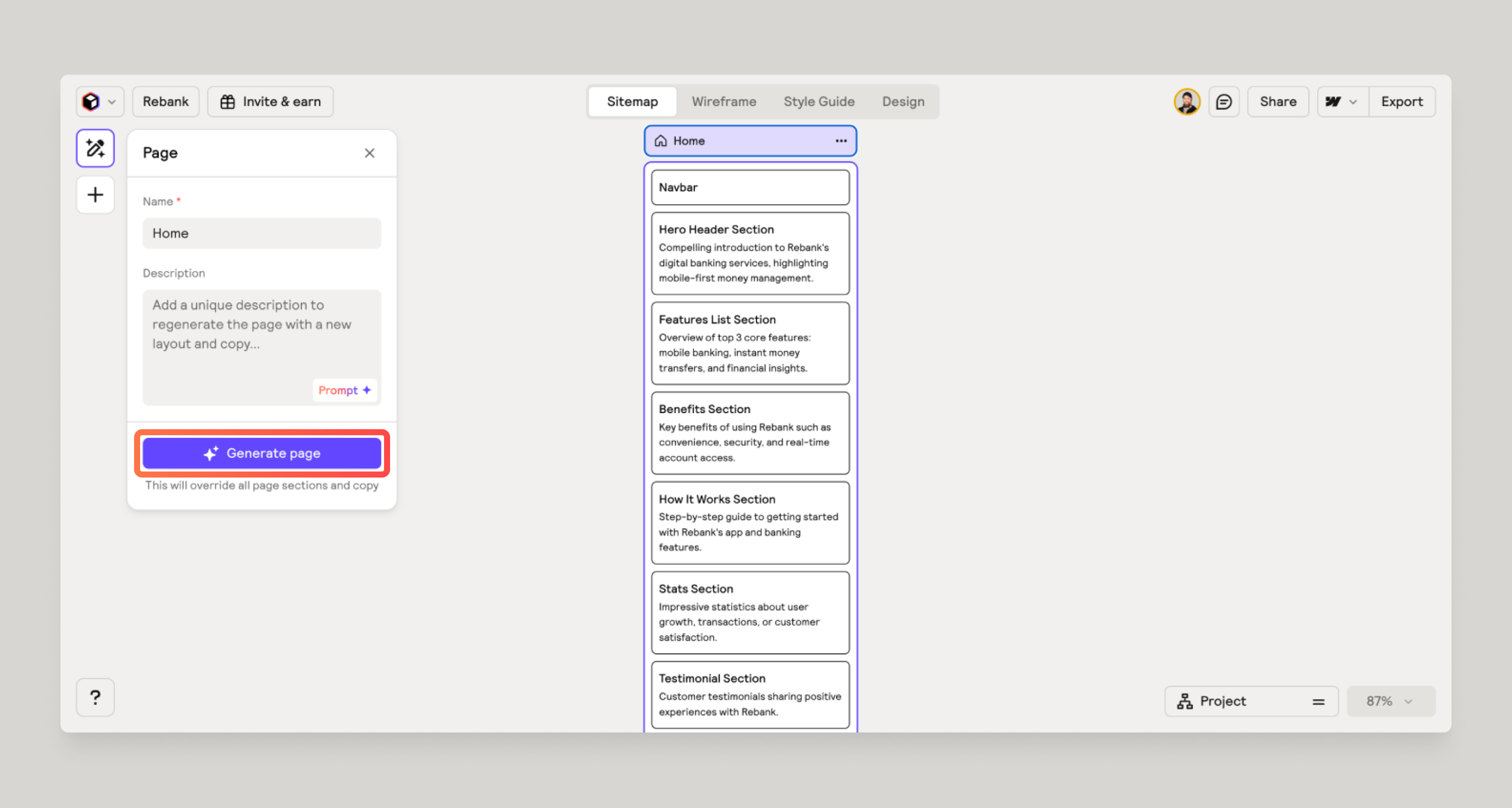
Review the content requirements as well as the layout. A statistics or testimonial section only helps when you have real evidence to put in it. If you don’t, replace it with something you can explain or demonstrate. An attractive section should earn its place in the page.
Use the style guide to explore typography, colours and a basic design direction across the components. Relume gives you a connected starting point; you still need to judge the hierarchy, edit claims and choose the details that make the site feel like the business.
Take the reviewed work into Figma or Webflow
For a design review, use the Relume Figma plugin with the current Figma Kit. Relume specifies version 3.0 or later for this workflow. It brings in the sitemap, wireframes, AI-written copy and style concepts so you can continue editing in Figma.
For implementation, the Relume Webflow app imports pages, sections and copy. Start a new project with the current Relume Webflow Style Guide: the documented app workflow requires version 3.0, and a style guide can only be imported once per Webflow project. Sections marked global can become Webflow components.
Choose the handoff around the work that remains. Use Figma when you need a detailed design and feedback stage; move into Webflow when you are ready to finish the responsive implementation, connect CMS collections and check forms, links and publishing settings. Importing a layout does not establish that those connections are complete. Relume’s planning sitemap is also not a replacement for your live SEO checks.
Choose the Export plan from your page list
The Export pricing shown on November 3, 2026 is in USD, per user. Annual billing is paid upfront. Check taxes and the current checkout offer; Figma, Webflow and live hosting costs are separate.
| Export plan | Monthly payment | Yearly payment upfront | Planning capacity and export |
|---|---|---|---|
| Free | $0 | $0 | 1 project, 1 page; Site Builder export to Figma only |
| Starter | $26 | $216 Equivalent to $18/month | 1 project, 5 pages; Figma, Webflow and React |
| Pro | $58 | $480 Equivalent to $40/month | Unlimited projects and pages; Figma, Webflow and React |
Source: Relume pricing, Export tab. Free also lists 30 Webflow and 30 React library components; that is separate from exporting a complete Site Builder project. Unlimited project/page capacity on Pro is not a promise of unlimited AI generation.
Count five pages before adding two more
Hypothetical project: Home, Services, Contact, Privacy and Terms are five planned pages. That fits Starter’s page limit. Add About and Work, and the plan now has seven pages, so it exceeds that limit. Count what you actually intend to create in Relume, including supporting pages, before choosing the plan.
Budget $78 for three paid months
For one user who needs Starter for three paid months, 3 × $26 = $78. The $18 figure is the annual equivalent: choosing it commits you to $216 upfront, rather than three $18 payments. This is our arithmetic for a hypothetical subscription period, not a measured project cost or Sebastian’s plan. Include the destination platform and implementation work in your own budget.
Publish and MCP are additional choices
Relume Publish lets you build and host a marketing site in Relume. Its workspace AI allowance and per-site hosting are separate costs. Treat it as a deliberate workflow choice: the current FAQ says you cannot transfer a project between Export and Publish. Newer Publish-to-Figma and Publish-to-Webflow instructions describe separate MCP workflows; they are not the classic Export app import.
There are also two different MCP connections. Paid Export plans list the Library MCP for React components; it does not manage Site Builder sitemaps or wireframes. The Publish MCP works with Publish projects and requires a paid Relume plan with access to Publish; Free and trial accounts are excluded. You do not need to install either connection to follow the classic Figma/Webflow import workflow above.
Start with one page and a real brief
Use a short brief to generate a first sitemap, then review one important page before expanding the project. The following is a proposed planning exercise, not a build performed for this review.
Website brief
Business and audience: [who you help and how]
Primary visitor action: [one action]
Pages required: [include supporting pages in the count]
Real evidence available: [examples, results, images or none yet]
Content supplied by the business: [facts and source material]
Sections that need CMS content later: [list]
Destination: [Figma for review / Webflow for implementation]

For the first page, review:
Does each section support the visitor’s next decision?
Can we substantiate the draft’s claims?
Which component or text needs changing?
What remains for the design and CMS handoff?
Next step: count the pages in your brief, review the generated sections and copy, then use the Try Relume button for the Export workflow. The provider links are direct and carry no affiliate referral.
Disclosure: Some of the links in this article may be affiliate links, which can provide compensation to me at no cost to you if you decide to purchase a paid plan. This site is not intended to provide financial advice and is for entertainment only.