

shadcn/ui gives you component source to edit inside your app. An alternative can change how much of that UI you maintain, how you apply a theme, or how much behavior comes ready to use. Choose the change you need before replacing the components you already have.
For a React app with plenty of forms and dialogs, Mantine is a sensible package-based candidate. MUI fits a Material Design direction and has a separate advanced-component offering. Chakra UI gives you its own token and composition system. daisyUI styles your HTML with Tailwind classes. Untitled UI React keeps the source-code approach while giving you a different design system.
If your only complaint is that the app looks like every other generated app, start with its layout, typography and theme. A new component library won’t decide those for you.
The useful question is: what do you want to stop owning? With copied component source, you can change the implementation directly. With an installed component package, you work through its public APIs, theme and update process. Both still need your application logic and testing.
Sources checked October 26, 2026. The new practical example is a Codex-executed migration of a fictional feedback inbox from local shadcn components to Mantine 9.7.4. Earlier shadcn, Untitled UI Free and daisyUI examples are linked below. MUI and Chakra UI are assessed from official documentation, not new hands-on tests. The demo stores data only in the browser.
Which shadcn/ui alternative fits your app?
Start with the model you want to maintain. These are five different choices, rather than a ranked list of interchangeable button collections.
| Option | Consider it when | What you maintain | Cost boundary |
|---|---|---|---|
| Mantine | You want installed React controls, forms and overlays with a central theme. | Your app logic, component integration and custom styles; Mantine packages and upgrades. | Open-source core and hooks. This example uses only free packages. |
| MUI | Material Design suits the product and you want to evaluate the MUI ecosystem. | Theme, component props, integrations and dependency upgrades. | Material UI is open source. Advanced MUI X Pro/Premium features require commercial licenses. |
| Chakra UI | You prefer its tokens, recipes and component composition over Tailwind component source. | The Chakra styling system, provider/snippets and your app logic. | The library is open source; separately sold templates/components are a different purchase. |
| daisyUI | You want semantic CSS classes on HTML you control, potentially outside React. | Markup, application behavior and interaction choices, including dialogs. | The component plugin is open source. A paid template or service is optional and separate. |
| Untitled UI React Free | You want its visual system and React Aria-based source while keeping code editable. | The copied source, its theme conventions and dependencies. | Free MIT components; PRO sections and full pages have separate terms. Figma is a separate product. |
If you haven’t built the app yet, our three free UI-library examples show how shadcn/ui, Untitled UI React Free and daisyUI differ at the first-build stage. The decision here is whether changing an existing foundation solves a real constraint.
Mantine: move to an installed React component system
Mantine puts the component implementation behind package imports. You configure its provider, load its styles and use its props and styling APIs. That can suit a founder who wants a coherent set of controls and is comfortable following one library’s conventions.
It’s still an integration. A form needs your validation and save behavior, and a theme won’t automatically reach CSS you wrote outside Mantine. Our migration below makes that boundary visible. The locked version, Mantine 9.7.4, requires React and React DOM 19.2 or newer within the 19.x line; an older React app needs a compatibility decision before this exact example applies. See the versioned package requirements, official Vite setup and provider documentation.
MUI: choose it for a Material Design direction
MUI’s Material UI is a prebuilt React component library based on Material Design. It’s a credible candidate when that design direction already fits your product, rather than a reason to make every app look the same. Its default setup uses Emotion, so this is a different styling integration from local Tailwind components. The installation guide explains the required packages.
Check the specific advanced component before budgeting. MUI X has Community, Pro and Premium packages; the existence of a free data grid doesn’t make every grid feature free. A needed Pro/Premium capability can change the cost of the choice.
Chakra UI: adopt its tokens and composition model
Chakra UI is worth considering if its component APIs and theme system make more sense to you than maintaining Tailwind component source. Current setup combines installed packages with generated snippets and a provider. Its theme uses tokens, recipes and a system configuration; the move involves learning those conventions, not renaming imports.
The current installation guide says Chakra uses Emotion at runtime today. A future zero-runtime direction is a roadmap, not a feature to assume in your app. Compare a representative screen against the current theming API.
daisyUI: keep control of your HTML
daisyUI adds semantic classes such as btn and card through a Tailwind plugin. You can use the styling with HTML in different stacks, rather than adopting one React component API. That is useful when your existing markup and behavior are a good fit.
The tradeoff is responsibility for the interaction. In our earlier three-library example, the daisyUI implementation used a native HTML dialog with application-managed behavior. A CSS class alone didn’t implement the save workflow. Check the official installation requirements and keep keyboard checks in your own acceptance criteria.
Untitled UI React Free: change the design system, keep editable source
Untitled UI React gives you source built on React Aria and Tailwind. You can edit it, but it has its own component and styling conventions. It suits a project that wants that particular design system enough to adopt those conventions. It won’t remove the maintenance work that comes with copied code.
The official free/PRO explanation distinguishes open-source components from additional PRO sections and full pages. Its Figma kit is a separate product. Start with the free controls you actually need; our free-build comparison shows the imports and repairs in a real small app.
When keeping shadcn/ui is the better decision
Keep shadcn/ui if editable source is the reason you chose it and your important screens already work. Changing the whole UI foundation creates new integration work. A theme, a better layout or one missing component may solve the problem with a smaller change.
Also separate an alternative from an add-on. A collection of shadcn-based blocks or animated sections may help you build a pricing page while leaving the underlying form controls in place. It doesn’t automatically replace the system you’re trying to leave. Inspect what the code imports and which dependencies and licenses it adds.
And distinguish the primitive layer from the finished UI. Choosing an unstyled interaction primitive leaves the visual design and component assembly with you. That makes sense for a custom design system; it’s a poor shortcut if your problem is having too much UI work already. The official shadcn introduction explains the source-distribution approach.
A real shadcn-to-Mantine migration
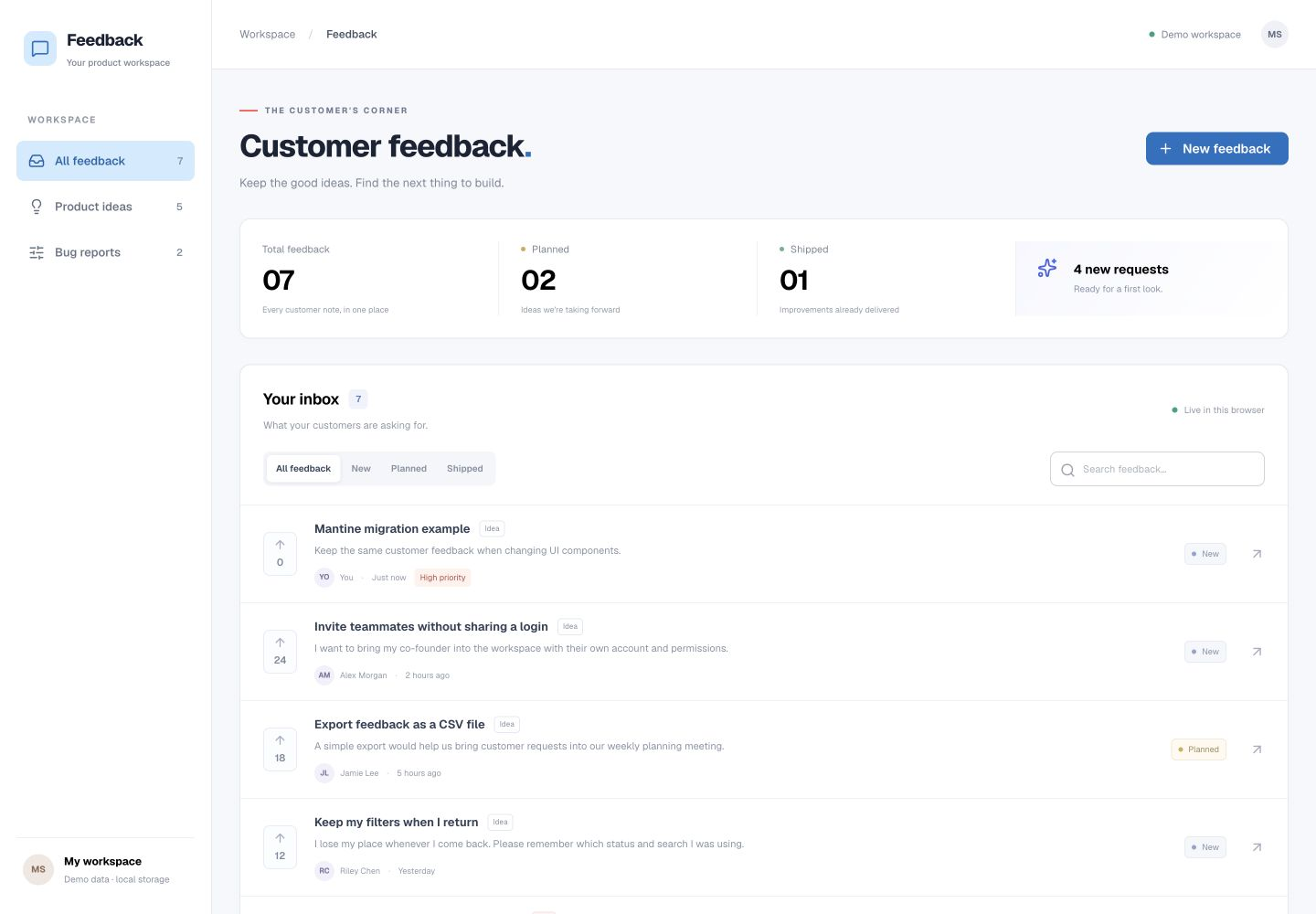
The example is a small customer-feedback inbox: a searchable list, status filters, a details dialog and a form that validates and saves requests. Codex migrated the existing React app to Mantine 9.7.4. React 19.3.1, Vite 8.3.5 and the fictional records stayed in place.
The component boundary was small enough to inspect. Our application imported three local wrappers—button, field and modal—rather than scattering vendor imports across every screen. Replacing those wrappers kept the filters, validation rules and browser-storage flow largely untouched. The new source adds an explicit demo-only write-failure branch for the error check below.
| Part | Original shadcn example | Migrated Mantine example |
|---|---|---|
| Button and fields | Local component files imported by our wrappers. | Button, TextInput and Textarea from @mantine/core. |
| Dialog | A local shadcn dialog using Radix primitives. | Mantine Modal, with its title and close-button API. |
| Theme | Local CSS/Tailwind values in the original project. | MantineProvider plus a bridge for application-owned CSS. |
| Data and validation | Fictional fixtures, application validation and localStorage. | The same logic, plus the explicit controlled write-error fixture. |
| Priority field | Native HTML select. | Still a native HTML select; this isn’t a library-select comparison. |
The first migrated build compiled and the form saved a request. That is a useful start, but it didn’t settle the styling or interaction checks.
The provider changed the button, not the custom sidebar
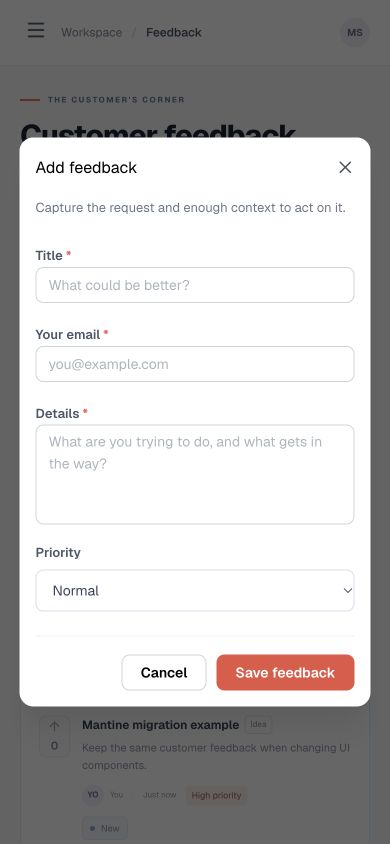
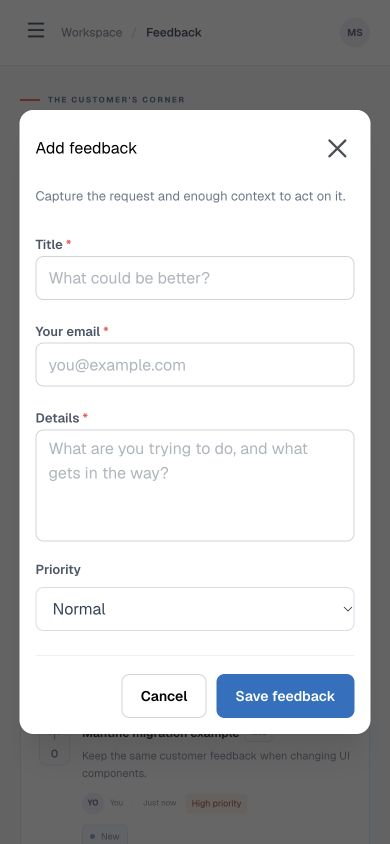
A follow-up change set Mantine’s primary color to blue. The library button became blue; our own sidebar remained coral because its CSS still contained the old values. That was the expected boundary between library-owned styling and our application styles.

We connected the app’s accent styles to Mantine’s generated CSS variables. The sidebar then followed the same theme without replacing it with a Mantine layout component. The final example also uses a darker blue shade.
:root {
  --app-accent: var(--mantine-primary-color-filled);
}
.nav-item.active {
  color: var(--mantine-primary-color-light-color);
  background: var(--mantine-primary-color-light);
}
The mobile form needed an explicit size decision
At a 390-pixel browser width, the migrated title and email fields were initially 36 pixels high with 14-pixel text. We set them to a 44-pixel minimum height and 16-pixel text, then checked the form again. The page didn’t overflow at that width. This was a usability adjustment to our example, not a claim that the default components had failed an accessibility audit.
The save behavior belonged to the app
A request with High priority was still present after a full reload, including its priority in the details dialog. The form marked empty fields and focused the first error. Escape closed the dialog and returned focus to its trigger; twelve forward Tab moves stayed inside the mobile dialog.
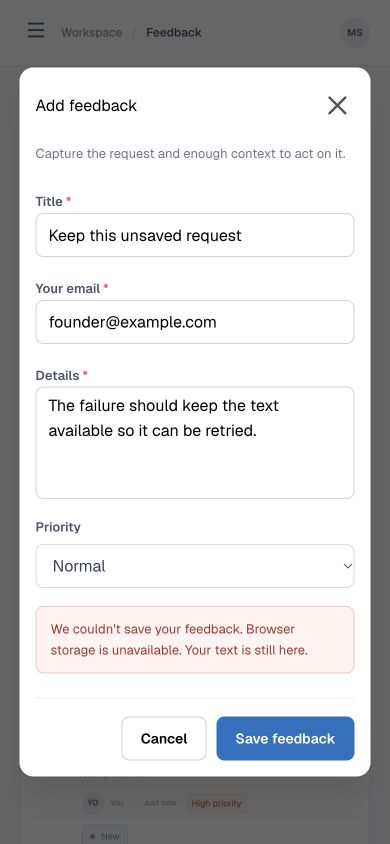
For a controlled failure check, the demo’s ?scenario=write-error route throws an error at the storage-write boundary. The form stays open with an alert and its entered text. This exercises the application’s failure handling; it isn’t a failed server request or a real browser-policy test.
What this example establishes: the small UI boundary could move to Mantine while keeping the existing list and form behavior. It needed provider/style setup, a bridge for custom theme colors and a mobile sizing adjustment. It doesn’t establish a faster agent, a lower token bill or production readiness.
Checks used desktop 1440 × 1000 and a 390 × 844 browser viewport. There was no backend, authentication, security assessment, physical-device test or full screen-reader/WCAG audit. The original shadcn and migrated Mantine code were handled by Codex, not two independent generators.
What changes when a coding agent builds the UI?
Give the agent the library and its version, then a bounded task. An API from an old tutorial can be valid for the wrong release. For the tested Mantine version, the current docs are the v9 docs.
Mantine now documents LLM-readable documentation, an official documentation MCP server and agent skills. Its MCP server searches and reads the docs; that is different from installing components or implementing your app. This migration used the official documentation, not a connected Mantine MCP or installed Mantine skill.
Chakra also publishes v3 skills for building, migrating and refactoring. Those are documented capabilities here, not tested output. If you keep shadcn/ui, our shadcn MCP workflow shows actual registry calls and a working example. None of these integrations removes the need to check labels, saved data, keyboard behavior and the UI on a narrow screen.
Try one screen before you replace the foundation
Choose a screen that contains a real form, a repeated list and an overlay. A static hero section won’t expose the same integration work. Keep the data contract and save behavior fixed so the result tells you something about the UI change.
Paste this brief into your coding agent inside a separate branch or copy of your app. Replace the bracketed fields before running it.
Evaluate a shadcn/ui replacement on one existing screen before changing the app.

Current project: [framework, React version, Tailwind version, package manager]
Candidate: [library and exact version]
Screen: [one real form, list and dialog that matter to the product]

1. Inspect the current components, styles and dependencies. Read the candidate's official documentation for this version. List any compatibility problem before editing.
2. Keep the routes, data shape, validation rules, storage/API calls and saved records. Replace only the agreed UI boundary. Do not invent a backend or add another component system.
3. Use the candidate's actual components and required provider/style setup. Explain which controls remain native HTML or custom code.
4. Connect application-owned colors and spacing to the chosen theme where appropriate. Preserve status/error meanings. Check the result at desktop width and 390px.
5. Verify labels, first-error focus, keyboard dialog behavior, save/reload, empty results and a controlled write failure. A failed save must keep the entered text.
6. Return the changed files, screenshots, actual failures and repairs, and anything still unverified. Stop after this screen; do not migrate the whole app yet.
You can also inspect the complete migrated example, the original reference files and the diff. The ZIP runs locally without an account or paid library. Its error routes are demo fixtures, and its records stay in your browser.
Download the migration example (.zip)
Includes the Mantine app, locked dependencies, README, original reference files and migration diff. Run npm ci, then npm run dev. Node.js 24.19.0 was used for this example. The included reference files are not a second standalone shadcn app; use the original three-library sources for that.

Affiliate Disclosure: Some of the links in this article may be affiliate links, which can provide compensation to me at no cost to you if you decide to purchase a paid plan. This site is not intended to provide financial advice and is for entertainment only. As an Amazon Associate I earn from qualifying purchases.