GoHighLevel, also called HighLevel, puts a CRM, messaging, booking, funnels and workflows in one platform. Agencies can give clients their own accounts and sell access under their brand. Before you switch, decide which part of that setup you need to carry over.
If your agency runs ads and books appointments for local businesses, start by evaluating Zuops. It brings ad creation, AI lead follow-up and branded client workspaces together. Keep HighLevel in the comparison if your business depends on automatic account provisioning, usage rebilling or a library of existing workflows. If you’re replacing the CRM and email for your own business, start with Brevo. Consider ActiveCampaign when multi-step email automation drives the decision and you can keep a separate CRM. HighLevel plans · Zuops for agencies · Brevo plans · ActiveCampaign plans
We checked public provider pages and individual user reviews on November 6, 2026. Sebastian uses Brevo. For this comparison, we reviewed public screens and documentation without running account workflows. The selected reviews surface tradeoffs to check, and the cost examples use hypothetical workloads.
White-label GoHighLevel alternatives for agencies
Check the login URL, the sender on a booking reminder, and what a client can access in their account. Then look at what your agency has to do when a new client pays. A branded login and an automatically provisioned, billed subscription solve different jobs.
| Platform | Useful when | Monthly price and what to verify |
|---|---|---|
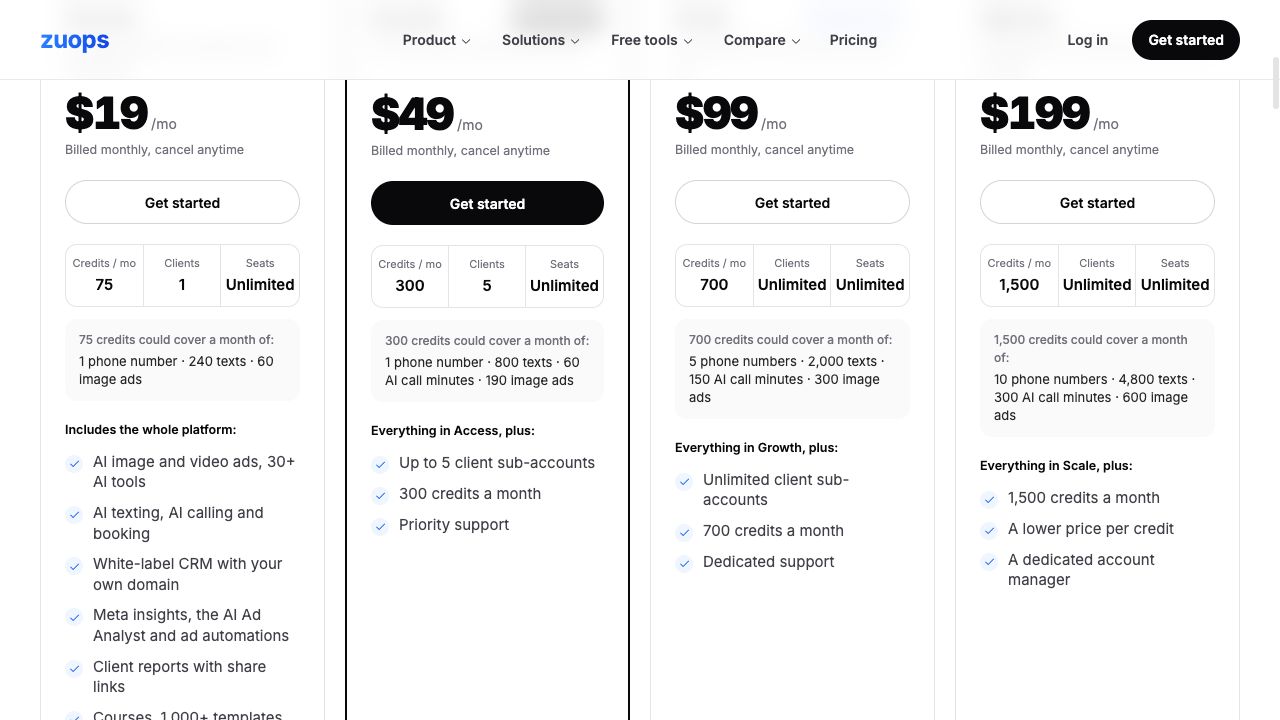
| Zuops | You run lead ads for local businesses and want branded client logins, separate inboxes and booking. | Growth is $49 for up to five client accounts and 300 pooled credits. Scale is $99 for unlimited accounts and 700 pooled credits. Verify what paid signup provisions and which billing steps still need you. Plans and credit rates |
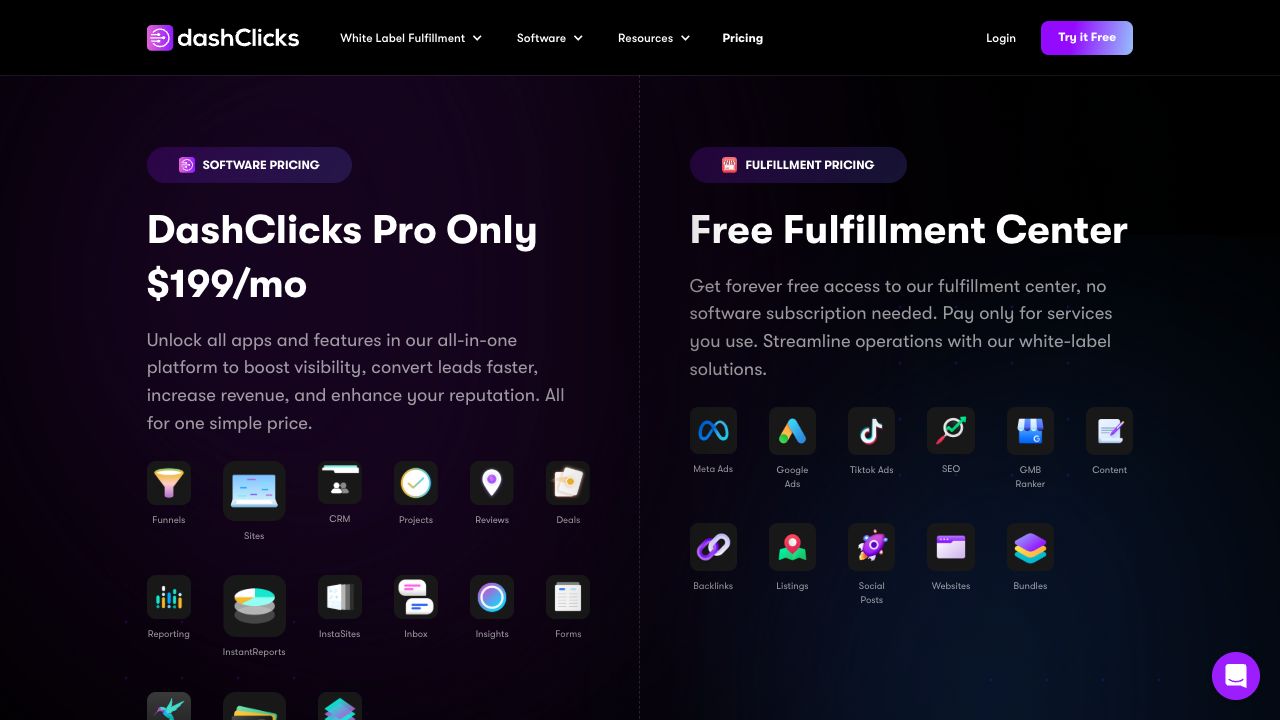
| DashClicks | You want a branded client workspace and the option to buy fulfillment, such as SEO or ad services. | Pro is $199 per month with unlimited sub-accounts. Quote fulfillment separately and ask to see your required workflow and billing steps. Plans and fulfillment |
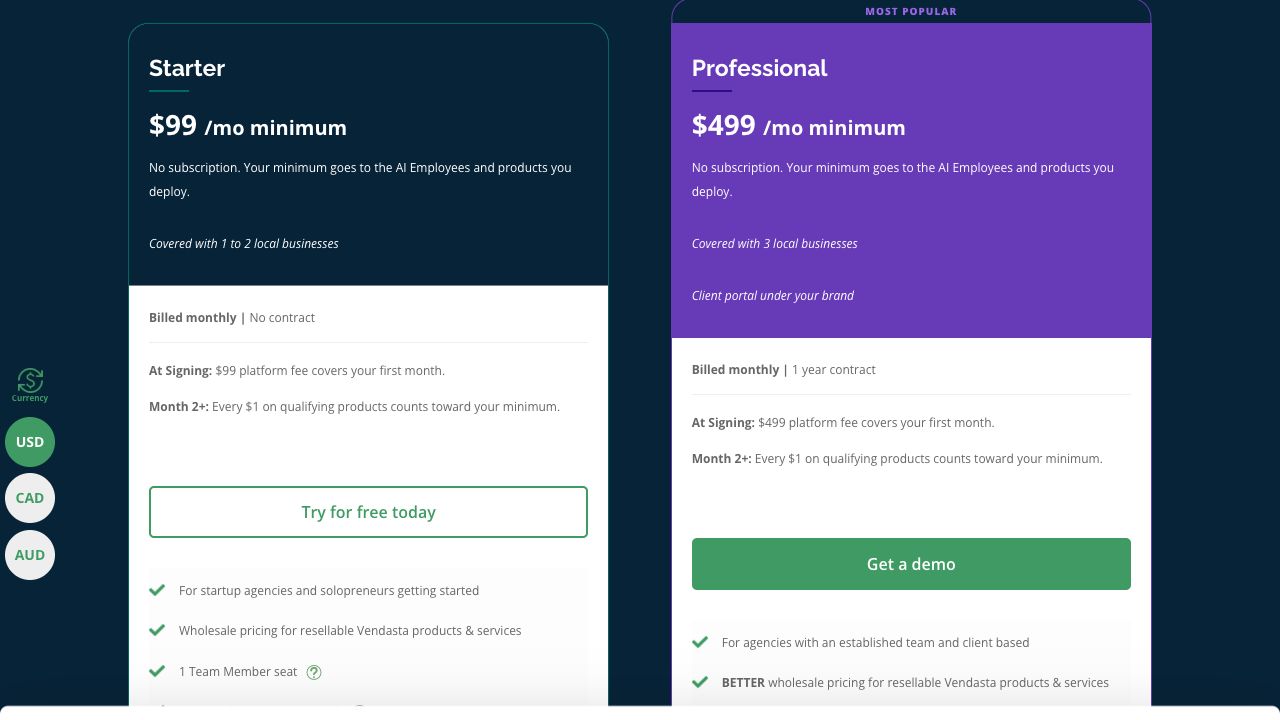
| Vendasta | You package and resell services or software from a marketplace and want a branded client portal. | Professional has a $499 monthly minimum and a one-year contract. The first month is paid at signing. From month two, qualifying spend counts toward the minimum. Plans and spend terms |
| HighLevel (baseline) | You already rely on HighLevel snapshots, or you sell subscriptions that need automatic client account creation. | The $297 monthly plan includes unlimited sub-accounts and desktop white label. SaaS Mode is on the $497 monthly plan. Model phone, email, AI and other usage separately. Plans · Usage and rebilling |
Zuops for the ad-to-appointment workflow
Zuops is Sebastian’s first pick to evaluate. The appeal for him is a cleaner interface and a leaner set of tools while keeping separate client accounts and white-label branding at a price he considers fair.
Use the Zuops checklist to plan your first client pilot.

Zuops documents a practical flow for a local service client. Give the ad studio an offer to draft creative, then check the copy and image before you run the ad. A Meta lead form or an embedded form feeds that client’s inbox. The texting agent can reply using the client’s business information, qualify the lead and offer a calendar slot. The team can take over the conversation. Ask a demo operator to show the handoff when the lead asks about a service the business doesn’t offer, and check that a STOP reply suppresses the next message. Zuops ad studio · AI texting and controls
Zuops documents agency branding on a custom domain, separate client roles and reusable snapshots. Clients install the branded web app from their browser. If your contract calls for an App Store or Google Play listing, that browser install won’t meet the requirement. Zuops lists paid signup links with Stripe Connect. Ask whether a paid signup can create the right account from a template, and have Zuops show how cancellations, failed payments and usage charges work on your intended plan. Branded web app · Client accounts, snapshots and billing
We found vendor demos and customer stories hosted by Zuops, with too little independent user evidence to judge support or migrations. If you’re planning to move paying clients, ask for a reference from an agency that already moved several accounts and uses the same messaging and billing setup you need. Zuops customer stories
Five client accounts can use more than 700 credits
Suppose each client uses one phone number, sends 240 SMS, receives 100 SMS, uses 20 minutes of AI calling and generates 20 image ads in a month. At Zuops’s listed rates, that’s 95 credits per client, or 475 credits for five clients. The five accounts fit Growth, but that workload needs more than its 300 credits. Scale’s included 700 covers it.
Raise AI calling to 60 minutes per client and the same workload reaches 775 credits. Now Scale falls 75 credits short. Compare a top-up on Scale with Agency at $199 per month for 1,500 credits before you upgrade. The model uses recurring number rental and no rollover. It excludes initial number setup, regular call charges, video generation, email, ad spend and taxes. Zuops rates and credit packs
DashClicks for outsourcing work under your brand
DashClicks separates the software plan from fulfillment. You can access the fulfillment center without a software subscription and pay for services you order. That makes it possible to assess the work you’d outsource before deciding whether you need Pro. Start with one deliverable and ask who approves it before it reaches the client. DashClicks software and fulfillment
Agency owner Andrew L. found the branded reporting useful but had to retry a contact import when a field didn’t map. A PPC customer writing in August 2025 liked the dashboard and onboarding and mentioned occasional communication delays during busy periods. Ask to see the client report, import a sample file and agree how your team will review work and handle revisions. DashClicks user reviews on Capterra
Vendasta for reselling a bundle of tools and services
Vendasta fits an agency that already knows what it wants to sell through a marketplace. Professional includes a portal under your brand. If you spend $150 on qualifying products in month two, you’d owe another $349 to reach the $499 minimum. Ask for a quote against the exact products you plan to resell and budget for the year before signing. Vendasta plan and minimum-spend terms
A Vendasta reviewer on G2 described using the marketplace, CRM and billing together and reported support friction during a system change. G2 labels the review incentivized. A 2023 Capterra review praised the white-label setup and wanted more customization in integrations and reports. Bring your actual bundle and the report you send clients to the demo. Vendasta user reviews on G2 · Vendasta user reviews on Capterra
When it makes sense to keep HighLevel
If a customer can subscribe on your website and receive a configured account automatically, your replacement needs to handle that step as well as the CRM. HighLevel documents automatic account creation in SaaS Mode. Price the time to rebuild the workflows, funnels and templates your clients actually use before comparing monthly rates. HighLevel SaaS Mode · HighLevel snapshots

Two G2 reviewers had different experiences setting up HighLevel. Rajesh liked having leads, appointments and follow-up together and found workflows took time to learn. A small-business reviewer writing on November 5, 2026 found the workflow builder quick to set up. G2 labels that review incentivized. If you’re switching for ease of use, ask the person who will own the system to build the same workflow in both tools. HighLevel user reviews on G2
CRM, email and automation for small teams
If everyone works from the same pipeline, price the contacts you’ll store, the email you’ll send and the people who need access. Run your first test from form submission to follow-up and deal creation. Those requirements will tell you more than the number of agency features in the plan.
| Platform | Useful when | Plan detail that can change the choice |
|---|---|---|
| Brevo | You want campaigns, marketing automation and a simple deal pipeline in one account. | Standard starts at $18/month with monthly billing for 5,000 sends and up to 500 stored contacts. Basic sales tools cover one pipeline and 50 open deals. Brevo lists Sales Essentials at $31/month for unlimited open deals and pipelines and sales automation. Price additional seats separately. Plans and limits · Seats |
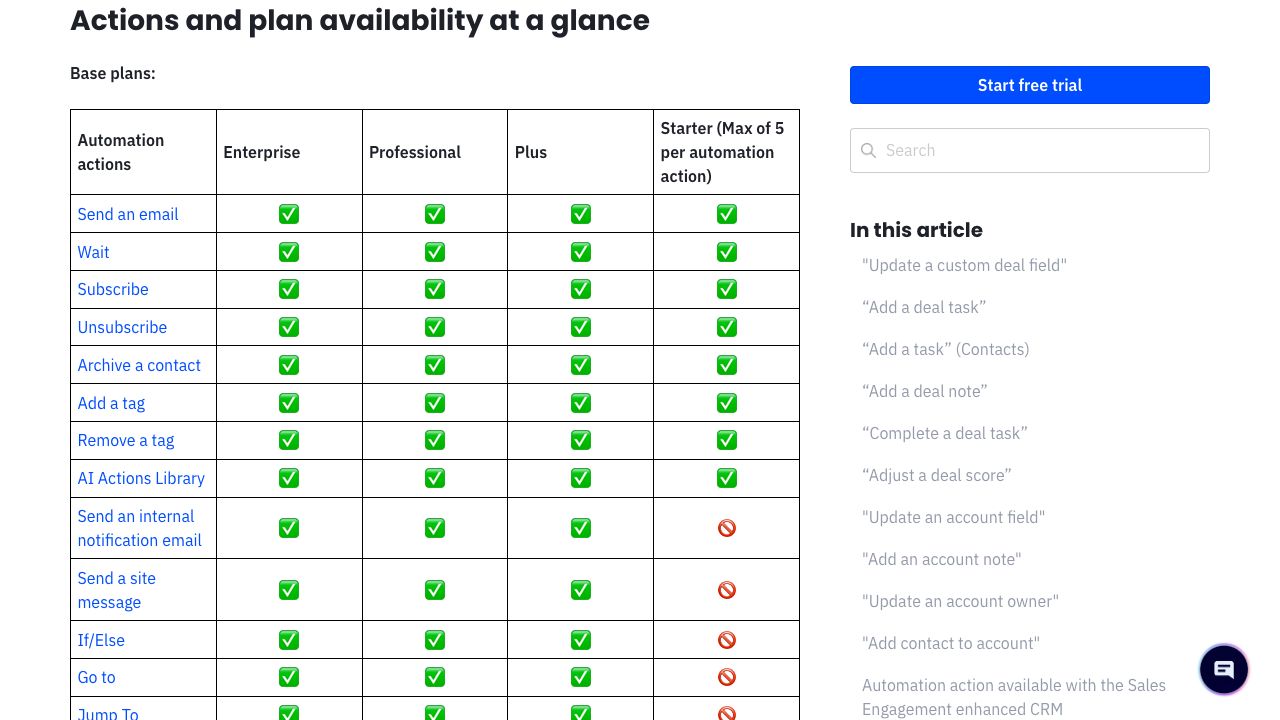
| ActiveCampaign | You already have a CRM or your priority is a more involved email sequence with branching. | For 1,000 contacts on annual billing, Starter is US$15/month equivalent (US$180/year) and caps each automation at five actions. Plus is US$49/month equivalent (US$588/year) and includes If/Else branching. Budget separately for the optional Pipelines CRM on Plus or above. Plans and add-ons · Automation actions |
Brevo for campaigns and a shared sales pipeline
Brevo makes sense when you have one marketer, one sales pipeline and a few thousand emails per month. If you send 5,000 emails and store 1,000 contacts, check the 10,000-send Standard tier, which accommodates up to 1,500 contacts. If two people need to work deals, price the seats and Sales package before comparing the total. Sebastian uses Brevo and recommends it for its features, ease of use and pricing. Brevo plan limits · Superfounder’s Brevo review

A marketing manager writing on Capterra in September 2026 found it easy to trigger emails from forms and wanted better reporting and export options. Consultant Prajwal B. liked the campaign editor and contact management and flagged contact limits and the learning curve for advanced automations. If reporting matters to you, export the fields your team uses before moving its campaigns. Brevo user reviews on Capterra
ActiveCampaign when email automation drives the choice
Consider ActiveCampaign if your CRM already handles deals and the email follow-up needs to branch on lead behavior. Write out the sequence. If it needs an If/Else branch or more than five actions, price Plus first. If you want the sales pipeline in the same product, include the optional Pipelines CRM in the quote. ActiveCampaign plan comparison · Plan limits for workflow actions
G2 reviewer Brian W. used the visual builder for a timed follow-up sequence but found syncing with outside systems took more manual work than expected. Micah J. liked tags and segmentation after getting past the learning curve. If you’re keeping your CRM, check that a lead’s status and opt-out reach both systems before switching. ActiveCampaign user reviews on G2
Run one switching test before moving your clients
Use one fictional lead and a test calendar. If you run an agency, use two client workspaces so you can check what each login can see. HighLevel snapshots copy selected setup assets within HighLevel and leave out contacts, appointments and live conversations. Zuops’s switching instructions call for exporting contacts and opportunities as CSV, importing them into client accounts and rebuilding key workflows and forms before saving a new template. Check what happens to your messages, appointments and subscriptions separately. HighLevel snapshots · Zuops’s switching instructions
- Capture and follow up. Submit a test form with a source tag. Check it reaches the right pipeline, triggers the right follow-up and stops on opt-out. Confirm an appointment lands on the right calendar and timezone if you use booking.
- Open the client view. For agency tools, sign in as each test client. Check the branding in the inbox, booking page and email, and check that neither client can see the other’s leads. If you resell subscriptions, demonstrate signup and cancellation in a test environment.
- Export and price the move. Check field mappings and suppression data with a small sample. Ask which histories, workflows, phone numbers and subscriptions can move and which need a rebuild. Check number availability in your market and use your actual message, call and seat counts for a quote.
Pick the workflow that pays for the switch and run it end to end. If you manage local leads for clients, start with the Zuops credit estimator and plan limits. If you’re buying for your own team, start by pricing your Brevo contact and email tier.
Prices are public US-market displays, before any applicable tax and usage charges unless noted. Confirm currency and terms at checkout. ActiveCampaign rates shown require annual billing.