
Airtable connects the records behind your business: clients, projects, content or products. It fits work that needs relationships and repeatable steps. Use our directory example and role-based cost calculation to decide whether the structure is worth the setup.


When Airtable is worth the setup
Airtable is a database platform for work that needs more structure than a list: clients linked to projects, products linked to suppliers, or articles linked to sources and publication tasks. You keep the underlying records connected, then give people views and interfaces for the job they need to do.
It's worth shortlisting when the same information gets copied between trackers or several people need to act on it. For one straightforward list, start with a spreadsheet. If your work mainly lives in documents, notes and a knowledge base, Notion deserves a look before you take on a separate operations database.
Sebastian uses and personally recommends Airtable. The practical example below comes from this directory's actual Airtable structure; the plan and AI assessment uses Airtable's documentation rather than a measured productivity or AI-output test.
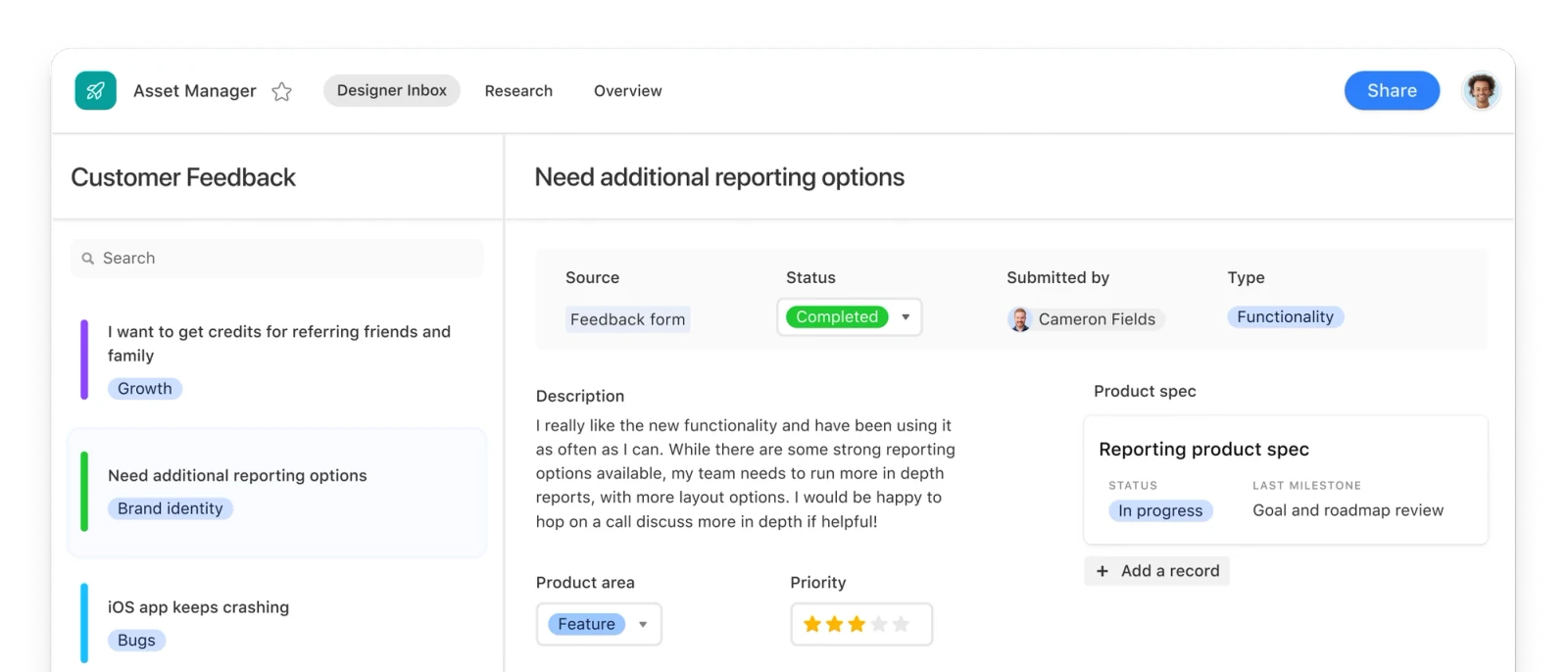
Product image: Airtable's official Interface Designer example, retrieved October 28, 2026. Manufacturer illustration, not our workspace.
A real example: how we structure this directory
A tool, someone's recommendation and an affiliate programme describe different things. Putting them in one row makes it easy to confuse “there is a referral link” with “this person recommends the product.” Our directory keeps them in separate linked tables.
This lets us change a programme's status without removing a valid recommendation, or record another recommendation without duplicating the product. It also exposes missing evidence: a personal pick can exist while its detailed review is still unfinished.
The useful part is the relationship, not the number of tables. For an agency, the equivalent might be one client linked to several projects and each project linked to deliverables. If you cannot describe what should stay connected when something changes, build less first.
What Omni and field agents actually add
Omni helps build and work with a base. You can describe a workflow, ask it to change the structure or work with records, and ask questions about the data. Its permissions follow yours. It has specific limits: for example, it cannot currently create new views, and asking it to undo a change cannot remove a newly created interface or page. Check the proposed structure before relying on it. Omni's current capabilities and limits.
Field agents work on individual records. On paid plans, with AI enabled and credits available, they can classify feedback, summarize a document or research information for a record. A formula is the better choice when the same input should always produce the same output. An agent interprets the input and can make mistakes; a generated category or research result still needs appropriate review. Airtable's field-agent guidance.
Building apps and agents with Omni, and its documented record creation/update actions, do not consume AI credits. Questions and field-agent runs do. Airtable lists 10 credits for an Omni question and gives typical field-agent costs of 1 credit for feedback categorization, 10 for web research and 200 for a ten-page document analysis. These are planning examples, not guaranteed costs for your inputs.
Included credits are pooled across the workspace on Free and Team, and across the organization on Business and Enterprise Scale. Self-serve credits reset on the billing cycle and do not roll over. A 10,000-credit pack is listed at $20 per month or $200 per year; Free users need to upgrade before buying extra credits. Start with a small sample and inspect actual consumption before running an agent across a whole table. AI billing and credit conditions.
Airtable pricing: count roles before seats
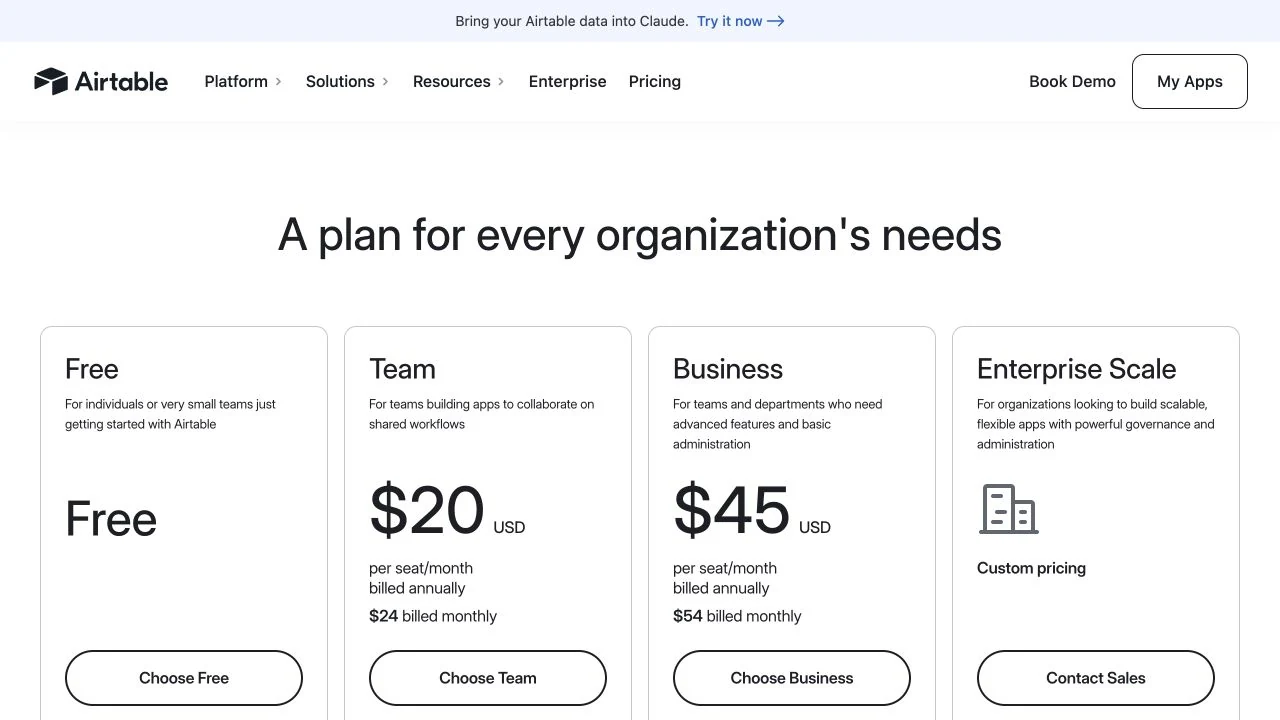
Prices checked October 28, 2026, in USD. Annual figures below show the full year, not a monthly subscription; tax and optional add-ons can increase the bill. Plans are attached to workspaces, so paying for one workspace does not upgrade every workspace you use.
The record limit covers the whole base, not each table separately. Enterprise Scale has custom pricing. See the public price display and detailed plan limits.
The commenter detail can change the cheaper plan
On Team, Owner, Creator, Editor and Commenter access is billable, including relevant base and interface access. On self-serve Business, Commenters are free; Owner, Creator and Editor access is billable. Read-only collaborators are free on both. These specific collaborator billing rules are more useful than simply counting everyone as an “editor.”
Consider a hypothetical paid workspace with two editors, including its owner, and three commenters. Team bills five people: 5 × $240 = $1,200/year. Self-serve Business bills two: 2 × $540 = $1,080/year. Business is $120 less in this particular arrangement, before tax and extras.
If those three people only need read-only access, Team instead costs 2 × $240 = $480/year. The decision changes with the work they need to do. Don't buy a higher plan just because the headline seat price or a hypothetical example suggests it. Standalone public form submissions and read-only share links do not add seats; a branded external client portal is a separate paid add-on to evaluate.
The limits to settle before moving your work
Editing permissions do not hide data. Restricting who can edit a field or table does not change who can see it in the base. For a client or freelancer who should only see part of the work, assess interface-only access and its sharing rules instead of giving base access and relying on hidden columns. Field and table permission boundaries.
Plan for internet access and an exit route. Airtable does not support offline working or self-hosting. Ordinary CSV export works table by table; filtered views can leave records out, and attachments need separate handling. A CSV is data you can take elsewhere, not a portable copy of the whole app, its interfaces and automations. Technical requirements; CSV export details.
Connections need their own capacity check. Free includes 1,000 API calls per workspace/month and Team 100,000. If an integration repeatedly reads and writes records, count that traffic alongside automation runs. Airtable can be useful behind an internal workflow; choosing it as an application's backend needs a separate assessment of access, API limits and operating requirements.
Try one connected workflow before upgrading
Choose a workflow you already repeat, then use this brief to keep the pilot small. You can fill it in yourself or give it to Omni. It is an evaluation exercise, not a prebuilt Airtable template.
Add a few representative records. Change a linked record and check the result where another person works. Try that person's actual access, including what they cannot see, and inspect an export. If the structure makes the work clearer, price the plan that covers it. If you're mainly maintaining the database rather than using it, simplify the setup before adding more automation.
Explore Airtable with one real workflow in mind. A free pilot is enough to learn whether the connected-record approach suits your work; confirm the paid feature and usage limits before committing.
Disclosure: Some of the links in this article may be affiliate links, which can provide compensation to me at no cost to you if you decide to purchase a paid plan. This site is not intended to provide financial advice and is for entertainment only.